




Описание
Create your own pages in Project Settings and Editor Preferences using Blueprint.
Add variables, compile, and read their values with Get Settings. Your settings are stored in standard Unreal Engine ini files. No C++ required.
Keep your server address, debug options and shared project settings in one place. Give your editor tools their own preferences, such as an export folder or a placement grid size.
Create a settings page
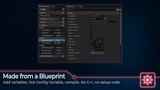
Choose Add > Blueprint > Blueprint Project Settings in the Content Browser.
Add your variables and enable Config Variable on each one.
Compile to create your page in Project Settings.
Your variable categories, descriptions and slider ranges appear on the page. Changes made there are saved to the ini file you choose. The default is DefaultGame.ini.
Read settings from your Blueprints
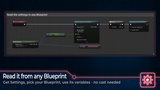
Add Get Settings, choose your settings Blueprint and read its variables from the node. Use the same settings in a character, game mode, widget or editor tool. The node returns the right type, so you do not need a cast.
Share settings with your team
Ini files are plain text. You can edit them outside Unreal Engine and see which values changed in source control. Share project settings with the team, keep personal preferences per user, or set different values for each platform.
Add preferences for your editor tools
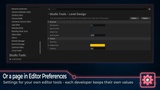
Choose Editor Preferences to create a page for your Editor Utility Widgets and other tools. Each developer can keep their own values, or the team can share the same settings. Your tools read them with Get Settings.
Save, reload and reset values
Save Settings lets an editor tool save changes made in its own window.
Reload Settings reads the saved values again.
Reset to Defaults restores the values you set in the Blueprint's Class Defaults.
Settings events let your tools react when values are loaded, saved or changed.
A Section Id keeps saved values linked to your settings when you move or rename the Blueprint.
Settings Blueprints are found and included when you package your game. Game settings are loaded at startup; editor preferences remain in the editor.
Full C++ source is included.
Also available in Blueprint Unchained: get this plugin together with Blueprint Quaternion, Blueprint Subsystems and Blueprint Instanced Struct in one package.
Documentation: Blueprint Project Settings documentation
Support: ask questions, get help and suggest features in #blueprint-project-settings on Discord.