描述
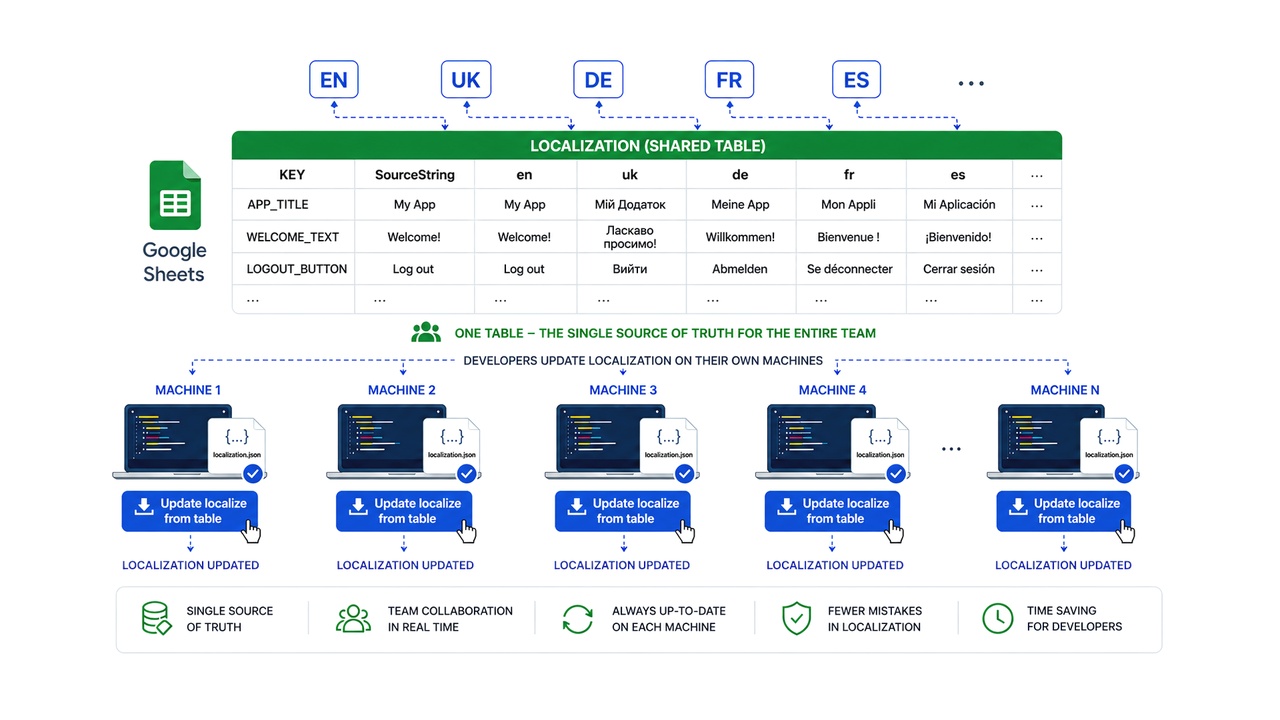
This plugin connects your Unreal Engine project directly to a single Google Spreadsheet, allowing your entire team to update game localization with just one click.
Demo video
⚠️ IMPORTANT: SETUP REQUIRED
To ensure the plugin works correctly, please follow the Quick Start Guide included in the documentation. Since this tool uses the Google Sheets API, a short one-time setup of a Google Service Account is required.
⚠️NOTE: This plugin relies on the built-in Python Script Plugin. Please make sure it is enabled in your Unreal Engine Editor under Edit > Plugins.
Quick Start:
Follow the Quick Start Guide included in the documentation.
Click the "Update Localization From Tables" button in the Toolbar.
Done! Your localization are now up to date.
Simple Workflow:
Update your Google Spreadsheet.
Click the "Update Localization From Tables" button in the Toolbar.
Done! Your localization is now up to date.