


説明
Find Expensive References. Understand Them. Fix Them.
Unreal Engine’s Reference Viewer shows you what references what.
Blueprint Reference Doctor shows you why a reference exists, how much it costs, whether it is necessary, and how to fix it safely.
Find hidden hard references, oversized dependency chains, unused asset variables, reference cycles, broken packages, redirectors and migration risks — directly inside the Unreal Editor.
Right-click a folder → Audit With Reference Doctor
Right-click an asset → Reference Doctor → Analyse References
Documentation: Download
Audit Entire Folders
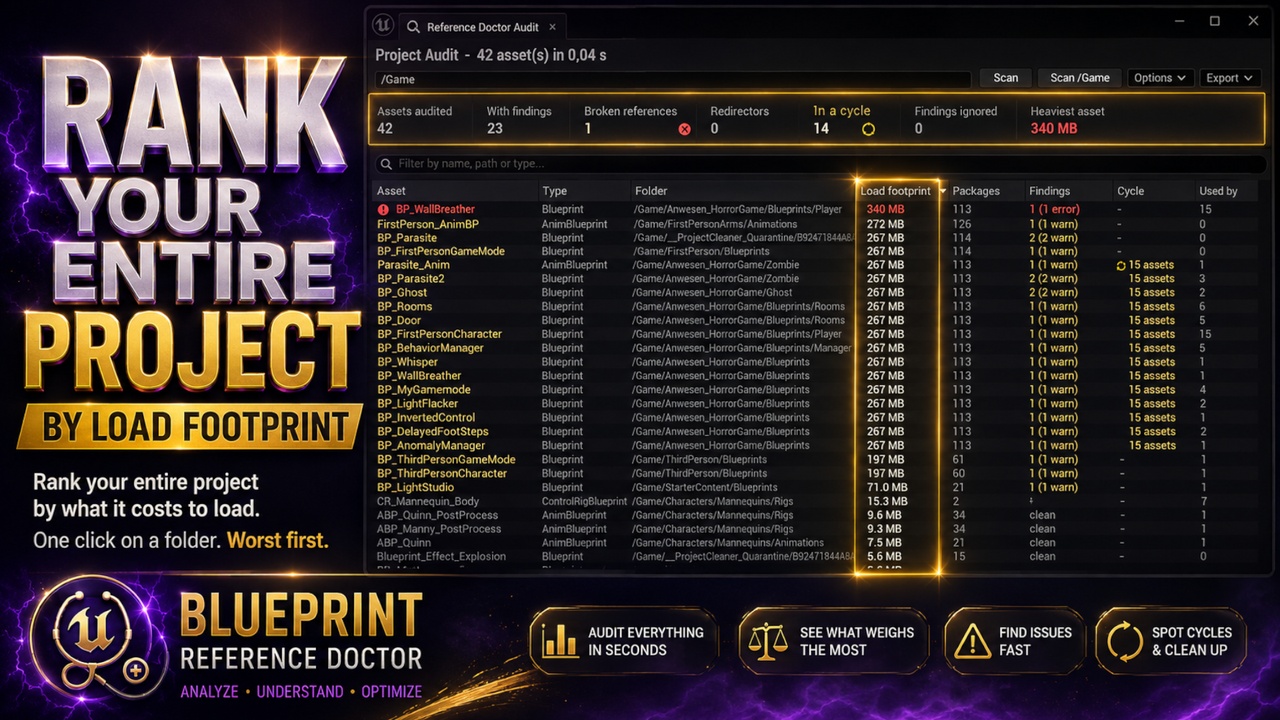
Audit any folder — including all of /Game — and rank assets by:
Total load footprint
Packages loaded
Findings and errors
Reference-cycle membership
Referencer count
The project-health summary shows broken references, redirectors, cycles and the heaviest individual footprint.
Every column is sortable. Double-click an asset to open its full report.
Standard audits use the Asset Registry without loading your assets, making them fast enough for large projects. Enable Deep Analysis for Blueprint graph and variable-level diagnostics.
Cancelled or limited scans are clearly marked. An incomplete audit is never presented as complete.
Understand Every Dependency
View both directions in one searchable window:
Everything the asset uses
Everything that uses the asset
Dependency trees include package sizes and can be filtered by name, path or class.
Every edge is colour-coded as hard or soft. Soft references are not expanded as part of the hard-load footprint because they do not automatically load their target.
See Why a Reference Exists
Blueprint Reference Doctor traces dependencies back to their exact source:
Hard: default value of property DeathEffect
Hard: component Mesh property StaticMesh
Soft: path literal on Open Level, pin Level Name
Hard: parent class BP_BaseWeapon
Hard: graph pin literal on Spawn Actor From Class
See the exact property, component, graph, node or pin responsible instead of manually searching through the Blueprint.
Find What Is Increasing Your Load Footprint
For every direct hard dependency, the plugin calculates the complete size of everything behind it.
Quickly identify:
The references responsible for most of an asset’s footprint
Dependencies pulling large package chains into memory
The references worth optimising first
Real Cut-Saving Analysis
Removing a large-looking reference does not always reduce memory usage. Another dependency may still load the same assets.
Blueprint Reference Doctor virtually removes each direct hard-reference edge, recalculates the dependency closure and reports the real saving.
Sometimes the result is zero because another reference still loads the same asset chain. When this happens, the responsible sibling dependency is identified.
Stop wasting time replacing references that would not reduce the actual footprint.
Diagnose Complete Reference Cycles
Assets inside a hard-reference cycle cannot load independently.
Blueprint Reference Doctor:
Detects the complete cycle
Reports it once
Lists every asset and edge involved
Shows which edges must be broken together
Calculates the footprint after the cycle is removed
See the complete problem instead of chasing individual circular references.
Find Hidden and Unnecessary References
Unused Hard-Reference Variables
Find Blueprint variables that:
Hold a hard asset or class reference
Have a default value
Are never read by any Blueprint node
The referenced asset still loads even though the Blueprint never uses it.
Hard References Inside Graph Pins
Assets or classes assigned directly to graph pins can create hard references with no visible variable.
The plugin reports the:
Graph
Node
Pin
Referenced asset or class
For supported class pins on an execution path, Blueprint Reference Doctor can rewrite the graph automatically.
Detect Rename, Migration and Packaging Problems
Find:
Broken references and missing packages
References resolving through redirectors
Hard references into /Developers/
References outside /Game
Hard references to entire Levels
Redundant dependencies loaded through another path
Ideal after folder reorganisations, asset renames, project migrations, Marketplace imports and large refactors.
Fix Problems Directly
Replace References
Replace supported references to asset A with asset B inside a Blueprint.
Supported locations include:
CDO properties
Component templates
Graph pin defaults
Variable defaults
TSoftObjectPtr
FSoftObjectPath
The replacement picker is class-filtered to reduce invalid substitutions.
Convert Hard References to Soft References
Convert eligible variables to:
TSoftObjectPtr
TSoftClassPtr
The default value is preserved.
Before making changes, the plugin runs a dry-run preview and rates the conversion:
Safe
Needs Review
Unsafe
It also lists node connections that may require Resolve, Load Asset or Async Load logic.
Promote Pin Literals to Soft References
For supported hard class references stored directly on graph pins, the plugin can:
Create a soft class variable
Preserve the selected class
Insert a blocking load
Rewire the execution path
Clear the original hard-reference literal
If compilation fails, the entire rewrite is rolled back automatically.
Additional Fixing and Navigation Tools
Fix up redirectors
Open the referenced asset
Show it in the Content Browser
Open the owning Blueprint
Jump directly to the offending graph node
Bulk Fixes and Safe Editing
Multi-select findings and use:
Convert All Safe Variables
Fix Up All Redirectors
Apply Selected Fixes
Each batch uses one transaction and one recompile.
A single Ctrl+Z undoes the entire operation.
Every supported modification is transactional:
Changes can be undone
Assets are not saved automatically unless enabled
Failed graph rewrites are rolled back
Compilation is checked after relevant fixes
After a fix, rescan to see the result:
Load footprint: 214 MB → 61 MB — 153 MB removed
When nothing changes, the plugin explains why.
Ignore Intentional Findings
Not every hard reference is a mistake.
Use Ignore This Finding to suppress a deliberate diagnosis for a specific path and optionally add an explanation.
Ignored findings remain visible and are counted separately.
An ignored warning never makes an unhealthy report appear clean.
Export Reports
Export results as:
JSON
CSV
Graphviz DOT
Markdown
Reports can also be copied to the clipboard for tickets, reviews, optimisation tasks and documentation.
Who It Is For
Technical artists and technical designers investigating memory and load-time problems
Solo developers and small teams working with inherited or older projects
Lead developers who need clear dependency reports
Marketplace and plugin developers checking unwanted dependencies before release
Blueprint-heavy projects with references hidden inside variables, components and graph pins
Support
For questions, suggestions or bug reports, please contact:
Enjoying Blueprint Reference Doctor? Please consider leaving a review — thank you!