

Descripción
Aura builds, playtests, and verifies Unreal Engine games🎮
That's why it's trusted by professional game studios worldwide.
Aura is different from other plugins in that we focus on intelligence. Gain a team of skilled agents to help your creative vision come to life, instead of hundreds of MCP tools that may or may not work.
It's the only offering on FAB that offers unlimited usage without an external subscription that also integrates flawlessly with Claude Code, Codex, and your favorite IDEs. Even wire it up to Epic's own Unreal MCP for better functionality.
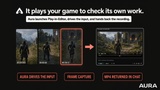
The only agent that playtests its own work 🧪
Describe a feature. Aura plans it, builds it, compiles it, then runs the game to verify it. The verification agent tests gameplay and UI and catches bugs before you review. If the editor crashes mid-task, Aura recovers and keeps going.
Checkout How Aura Works▶️
Building an entire city using Aura
Build and Optimizing Backrooms Inspired Unreal Game
Trusted By Developers 💬
Used by over 10,000 game teams, including IronMace (Dark and Darker, Over 20 Million Players) and Sinn Studio (Top Grossing VR Studio).
Sinn Studio cut production on ZOMBONK from 8-12 months to 4-5. Environments came together 5x faster, props 6x faster, code onboarding 20x faster.
"Aura indexed our project in real-time and was the most knowledgeable programmer on our team when it came to the bulk of the codebase."
-- Alek Sinn (Chief Product Officer, Sinn Studio)
"I’m a believer now. It helped me develop an entire tutorial from scratch in a few weeks with a lot of the base system created by an engineer who previously had little familiarity with our codebase. What would have taken us 5-6 weeks to complete was completed in half the time because of Aura."
-- Terence Park (Cofounder and President, IRONMACE)
Unlimited usage - no separate subscription required
Aura comes with unlimited usage plus monthly premium credit for frontier models like Claude Opus, XAI's Grok. 86% of users never hit the our generous usage limits.
Details
What you get on Fab 📦
The Aura plugin for Unreal Engine 5.4–5.8 and Fab Store Only: C++ source.
One year of Aura Indie included; Fab Store Only: continued external MCP access requires no Aura subscription
After the first year, Indie is $10/month or $120/year.
Aura Features 🛠️
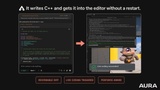
Blueprints & C++: Build gameplay, review Blueprints, and compile changes.
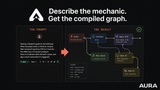
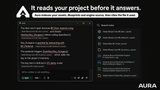
Project Understanding: Search code and assets, inspect graphs, and explain systems.
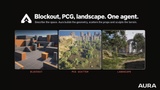
Level Design & PCG: Create blockouts and geometry, and scatter assets.
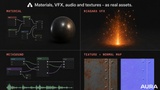
Materials & Niagara: Create and edit materials, VFX systems, and emitters.
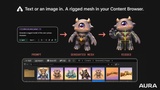
Animation: Automate rigging and retargeting, and import meshes and animations.
UI & Game Data: Edit UMG, behavior trees, and data tables; inspect Gameplay Abilities and StateTrees.
Playtesting: Run gameplay and UI tests to identify bugs before review.
Unreal Python: Automate editor tasks and asset operations.
Skills & Agents: Run or author Claude Code and Codex skills, subagents, and workflows.
MCP Integration: Use Claude Code, Codex, Cursor, or any MCP client. External tool use stays unlimited after Indie expires; AI charges apply.
And much more.
Works the way you work
Ask, Plan, and Agent modes: analyze, architect, then execute.
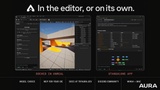
Run docked in the editor, standalone, headless, or from your IDE.
Supports running your Codex and Claude Code skills, custom subagents, and dynamic workflows, and can even author them.
Skills: Claude Code-compatible workflows learned from your repeated tasks.
Filesystem Sandbox (UE 5.8, experimental): edits stay staged until you review and persist them.
Bring your own agent (MCP)
Aura installs two MCP servers:
unreal_inspector (read-only):Analyzes your Unreal Project .
unreal_editor (authoring): Makes things for you.
Model calls bill to your IDE's AI plan, not to Aura. On Fab, MCP tool use is unlimited with a free Aura login.
Works with Unreal's built-in MCP (5.8+)
Unreal Engine 5.8 ships Epic's experimental Unreal MCP plugin, with native toolsets for scenes, actors, materials, and objects. Aura supports it as an opt-in. Enable the plugin in Edit > Plugins, then turn on the integration in Aura's settings. Aura can then use Epic's native tools alongside its own, including custom toolsets registered with Epic's Toolset Registry. On 5.4–5.7, Aura's own MCP servers cover everything.
Your free year of Aura Indie
Indie includes unlimited Auto Mode, $15 of premium credit each month, Unreal and Unity support, unlimited MCP with external agents, and 3D model and audio generation.
To redeem: create a free Aura account, open Settings in the Aura app, and follow the instructions. Already subscribed? Cancel your current plan first, then redeem.
You won't be charged automatically. When the year ends, add payment details to continue Indie ($10/month or $120/year), or don't: your Fab license stays yours, and Aura's MCP tools keep working with any external MCP client.
Plan details: tryaura.dev/about
Requirements
Unreal Engine 5.4–5.8
Windows 10/11, 64-bit
A free Aura account and an internet connection
Dependencies
Aura enables the following Unreal Engine plugins in your project.
RemoteControl - For Remote Control HTTP API.
PythonScriptPlugin - For in-editor Python execution.
EditorScriptingUtilities - Provides the asset and level scripting libraries that Aura's tools rely on.
GameplayAbilities - Lets Aura find and inspect abilities, gameplay effects, attribute sets, and gameplay cues, and read attribute values.
StateTree - Lets Aura read and explain StateTree assets.
EnvironmentQueryEditor - Lets Aura work with EnvQuery assets.
PropertyBindingUtils - Used to read StateTree property bindings. Enabled on UE 5.4 and later.
EnhancedInput - Lets Aura create and inspect Input Actions, Input Mapping Contexts, and Enhanced Input Blueprint nodes.
GeometryScripting - Powers Aura's mesh work: blockout geometry such as staircases, texture baking, UV checks, and mesh repair in the model generator.
PCG - Procedural scatter across surfaces and volumes for the level design agent. Used on UE 5.5 and later.
MeshModelingToolset - For working with collision on meshes the model generator imports.
IKRig - Powers auto-rigging and retargeting.
Interchange - Used by Aura when importing meshes and animations.
CascadeToNiagaraConverter - Aura's VFX agent uses its FX utility library to create and edit Niagara systems and emitters.
AVCodecsCore & NVCodecs - Hardware video capture (NVENC) of Play In Editor sessions. Used on UE 5.8.
FileSandbox - Aura applies its edits inside a native editor sandbox so you can review, keep, or discard them. UE 5.8 only.
SandboxedEditing - Shows Aura's sandbox in the editor's own Sandboxes panel. UE 5.8 only.
ModelContextProtocol - One-click setup of Unreal's built-in MCP server so external AI clients can work with your editor. UE 5.8 only.
AllToolsets - Supplies the tool sets that the built-in MCP server exposes. UE 5.8 only.
Aura also uses ControlRig and Niagara, which Unreal Engine enables by default.
First time setup of Aura will direct you to download the Aura client app and requisite software components as well, which includes a Python application and MCP servers.
Docs: www.tryaura.dev/documentation/fab
Community & Support: discord.gg/tryaura