Saltar al contenido
Multimedia 1 para anuncio MarkdownAsset

Descripción

The Markdown Asset plugin seamlessly integrates Markdown into your Unreal Engine workflow. Create, import, convert, and manage .md files directly within the Content Browser as first-class UMarkdownAsset objects. Whether you're writing in-editor documentation, managing game lore, or feeding formatted text into your UI, this plugin has you covered.

Live Preview Editor

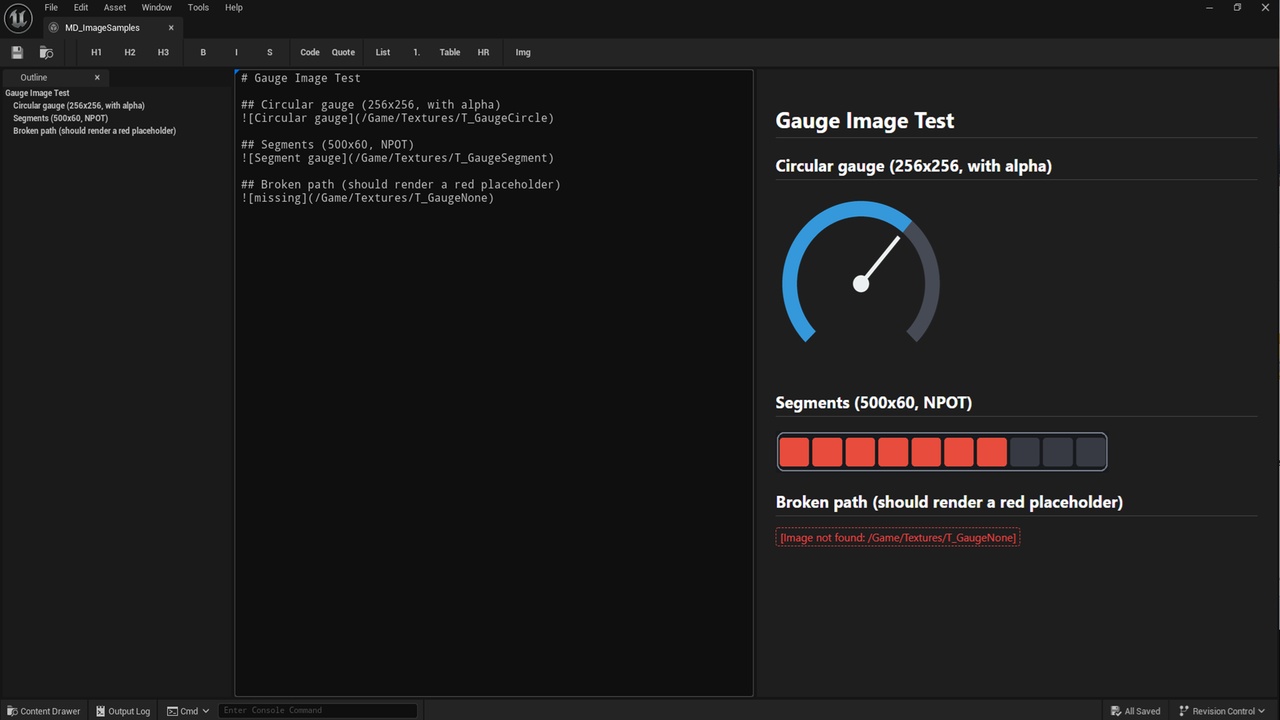
Editing is a breeze with the built-in dual-pane editor. Write raw Markdown on the left and watch the right pane update in real time (with a 0.3-second debounce for smooth typing) into a beautifully styled, dark-themed HTML preview. A formatting toolbar and standard keyboard shortcuts (Ctrl+B, Ctrl+I, and more) speed up your writing, and full Undo / Redo (Ctrl+Z / Ctrl+Y) is integrated with the Unreal Editor transaction system.

Convert Existing Documents to Markdown

Already have your design docs, briefs, or lore in another format? Bring them straight into the engine. Powered by Microsoft's markitdown, the plugin converts .pdf, .docx, .pptx, and .html files into UMarkdownAsset content.

  • Drag & Drop Conversion: Drop a supported document into the Content Browser — or Reimport an existing asset — to convert it and store the result as the asset body.

  • Batch Convert Wizard: Tools > Markdown > Batch Convert to Markdown... processes many documents in one pass, with file selection, a cancellable progress dialog, and a completion notification.

  • Editor Scripting: Run the same conversions from Blueprint or Editor Utility Widgets via UMarkitdownBlueprintLibrary.

  • Configurable: A dedicated Project Settings > Plugins > Markitdown page lets you set the markitdown executable path and conversion behavior.

Asset & Class Linking

Turn your documentation into a navigable knowledge base — without ever leaving the editor.

  • Wikilinks: Write [[AssetName]] to link between Markdown assets. Click in the preview to open the target in a new tab.

  • Asset Links: Standard links targeting a package path (/Game/..., /Engine/..., /Plugins/...) open the corresponding asset editor.

  • Class Links: [Label](class://ClassName) jumps straight to a C++ class in your IDE, or to a Blueprint class in the Blueprint editor.

  • Broken Link Detection: Unresolved links are highlighted in red, valid links in teal, so dead references never go unnoticed.

Fast & GFM Supported

Under the hood, the plugin statically links the highly compliant md4c C library. It supports GitHub Flavored Markdown (GFM) — tables, task lists, and strikethrough — with no network dependency. All Markdown-to-HTML conversion runs locally and instantly on your machine.

Built for Safe Rendering

Designed to safely render user-supplied or untrusted Markdown:

  • Raw and inline HTML blocks are disabled by default to prevent XSS.

  • A URL scheme allowlist blocks dangerous schemes such as javascript: and file:.

  • A Content-Security-Policy blocks external network requests (remote images, fetch/XHR, fonts), mitigating SSRF and IP tracking.

  • Clicking an external http(s):// link shows a confirmation dialog with the full URL before opening your browser.

Blueprint Integration

Markdown text isn't stuck in the editor — access it at runtime. The UMarkdownAsset exposes a read/write RawMarkdownText property plus several Blueprint nodes, and because it lives in a runtime module, it works in packaged builds:

  • Get Parsed HTML: Converts Markdown into an HTML string, perfect for a UI WebBrowser widget.

  • Get Plain Text: Strips all Markdown syntax for clean text in standard UMG Text Blocks or 3D text.

  • Get Raw Markdown Text: Retrieves the exact source text for custom rendering pipelines.

Key Features
  • Custom Asset Type: UMarkdownAsset with Content Browser thumbnails ("MD" label + content preview).

  • Document Conversion: Import PDF, DOCX, PPTX, and HTML as Markdown via markitdown, single or batch.

  • Asset / Class / Wikilink Navigation: Jump to assets, C++ and Blueprint classes, and other Markdown docs from the preview.

  • Live Dual-Pane Editor: Real-time HTML preview with a comfortable dark theme.

  • Drag & Drop Import: Import, reimport, and export .md / .markdown files.

  • Toolbar & Shortcuts: 12 built-in formatting commands with Undo / Redo support.

  • Secure by Default: HTML disabled, URL allowlist, CSP, and external-link confirmation.

  • High Performance: Statically linked md4c parsing — local, fast, no network required.

  • Runtime Ready: Blueprint API works in packaged games, not just the editor.

  • Fully Localized UI: Editor interface in English and Japanese.

Formatos incluidos