


Descripción
📽 Launch video | 🔬 Read the manual
ModGate: Mod Package Risk Check for Workshop and mod.io Mods (UE 5.5–5.8). Free check for UE mods: finds Blueprint script, dangerous engine calls, native code and scripts in .pak, IoStore and .zip mods without loading them. Plus a LaunchURL fix.
In July 2026, a Steam Workshop map passed review with nothing in it but container files. It still put a remote-access trojan on players' PCs.
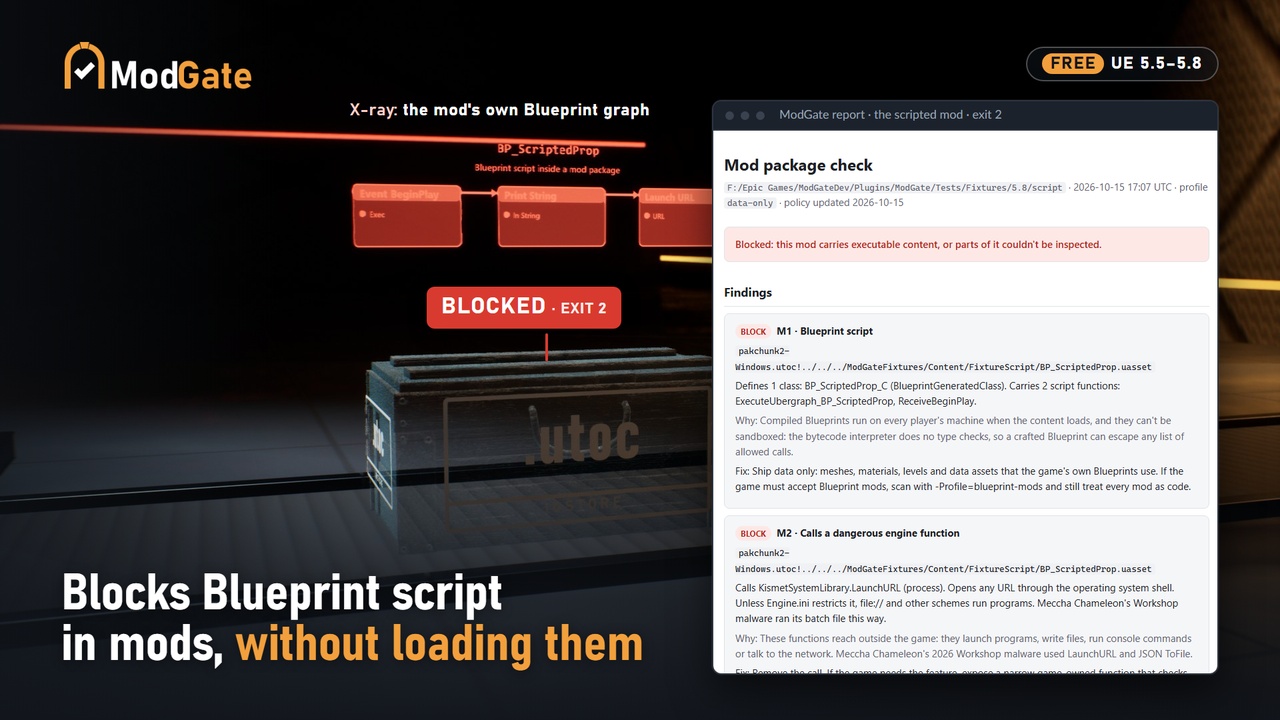
The map was Laser Tag Neon, for the UE5 game Meccha Chameleon. Its folder held an IoStore container, a preview image and some metadata. Inside the container was one Blueprint actor, named like an ambient controller. When a match started, it asked the engine for the player's user folder, used the JSON plugin's ToFile to write a batch file into Documents, and that batch file fetched the trojan. An earlier proof of concept went the other way: it shipped a .bat beside the map and opened it with LaunchURL, which on Windows hands anything that isn't a web link to the shell.
There was no .exe to spot. A file-type filter wouldn't have caught it, and the game's first fix was exactly that. Khael Kugler and Feint wrote it up in June and July, and both posts are worth your time. I read them, then the engine source, and built the check I'd want to run on every upload.
What ModGate does
It reads a mod's packages as data and never loads them. Then it tells you what's in there that could run. A data-only mod (meshes, materials, maps that place your own game's Blueprints) comes back clean. The Laser Tag Neon pattern comes back blocked: once for the Blueprint script, and again for the ToFile call. It's free.
- Blueprint script. Any class or script function inside the mod. Under the default data-only profile that's a block. Compiled Blueprints can't be sandboxed: the bytecode interpreter does no type checks, so a crafted Blueprint can get past any list of allowed functions. I'd rather tell you that up front than sell you a sandbox.
- Calls to dangerous engine functions. `LaunchURL`, file writes like `ToFile`, console commands, Python, HTTP: 31 functions across 6 modules, in a policy file you can edit. A cooked package stores what it imports as a hash of the path, so ModGate hashes its list the same way. It finds these calls even when the plugin that defines one isn't loaded.
- Native code. Executables and libraries are found by their bytes, not their names, so a Windows program renamed to .png is still caught. So is a plugin descriptor that brings code modules.
- Script and shell files, command text, config files. A .bat or .ps1 in the mod, powershell or %TEMP% sitting in a Blueprint string, an .ini, or any file type that isn't on the allow list.
- Anything it can't read is blocked. Encrypted, cut off, corrupted, cooked by another engine version, or a zip entry that tries to escape its folder. I tested 12 kinds of damaged download, from a .utoc cut in half to a corrupted pak index. All 12 come back blocked, and none crash. Every entry is checked against the hash its container stores.
Every finding says what was found, why it matters and how to fix it.
The LaunchURL hole, closed in one click
Unreal 5.5 to 5.8 ships LaunchURL's allow-list empty. So any Blueprint, yours or a modder's, can open any URL, and on Windows a file:// path runs whatever it points at. It's one config section, and it ships empty.
Tools › ModGate › Audit This Project checks it with the engine's own URL filter, built the same way LaunchURL builds it. Restrict LaunchURL to https… then writes the fix to DefaultEngine.ini, after backing the file up once:
[SystemLibrary.LaunchURLFilter https]
If your game opens steam:// links on purpose, run the fix from the command line with -AllowSchemes=https,steam.
The audit also lists the dangerous functions Blueprints can reach in your build, and your own Blueprint-callable functions whose names suggest file, process, console or network access. That helps you decide what modders get to touch.
In the editor, and in your pipeline
- Tools › ModGate › Check Mod Folder… or Check Mod File… The scan runs in a separate process, so a malformed file can't take your editor down, and the HTML report opens when it's done.
- Headless: UnrealEditor-Cmd YourGame.uproject -run=ModGate -Package=<upload> -FailOnWarn. Exit 0 is clean, 1 is warnings, 2 is blocked and 3 is bad input. Any other code means the process died, so treat it as blocked. You get JSON for your tools and HTML for people.
- It reads a Workshop item folder as downloaded, .pak, IoStore .utoc/.ucas, mod.io .zip files, and loose .uasset/.umap.
- It's quick: a whole base game, 395 to 494 cooked packages in my tests, takes between 6.4 and 8.4 seconds, editor start-up included.
What it won't do
- It isn't an antivirus, and it doesn't detect malware. It tells you a mod carries something executable. Whether that's malicious is your call, and under the default profile you don't have to make it: the mod doesn't ship.
- A clean result isn't a promise that the data is safe. Malformed data can still attack the engine's own loaders, and data can steer your game's code. ModGate lists the game classes a mod places, so you can check they're the ones you meant to expose.
- It reads mods cooked by the engine version it was built for. Anything else fails closed. So do encrypted containers.
- Pak indexes are still parsed by Epic's reader. ModGate checks the pak footer and the index's own hash first, which stops accidental damage. A deliberately crafted pak could still stop that process, which is why the editor scans out of process and why CI should treat odd exit codes as blocked.
- I've run the editor and the commandlet on Windows only. The code also compiles for Linux with each engine's own clang, but I haven't run it in a Linux editor. It reads mods cooked for Windows, Linux and Android.
- 1.0 doesn't enforce anything when your game mounts a mod. Mount only what passed. A runtime gate is on the roadmap if studios ask for one.
What you get
- C++ source for two editor modules. No Blueprints, no content.
- The policy as an editable JSON file, with two profiles: data-only (the default) and blueprint-mods, for games that already accept Blueprint mods.
- The Tools menu and the -run=ModGate commandlet.
- JSON and HTML reports.