


Beschreibung
Discord Bug Reporter is an easy to use Unreal Engine plugin that enables players to send detailed in-game bug reports including text, screenshots, system specs, video settings, save files and logs, straight to a Discord channel of your choice using a webhook. It can be sent to either a normal text channel or a forum post channel allowing you to easily organize incoming reports. An optional and free Discord bot can further improve organization and task management.
Setup takes seconds: open Project Settings, paste your Discord webhook, and customize the included widget if desired. Players can submit a report at any time using the Bug Report hotkey (F6 by default) or from a menu, giving you immediate, actionable feedback to resolve issues quickly.
Features
Easy setup
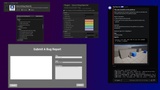
Configure everything in Project Settings → Plugins → Discord Bug Reporter. Paste your Discord webhook URL and you're ready to go.In-game bug reporting via a fully customizable widget
Players can submit a report including:
– Screenshot
– Title & description
– Map name
– Bugitgo location- Session Duration
- System Info (OS, CPU, GPU, RAM)
- Video Settings (Resolution, Graphics Quality, Vsync)
- Generated or specified User ID
- Save Game Files
– Logs
The widget (WBP_BugReport) is located under Plugins → Discord Bug Reporter Content and can be edited as desired.
• Works everywhere
Compatible with the Unreal Editor, Development builds, and Shipping builds.
• Customizable hotkeys (keyboard + gamepad)
Configure separate hotkeys and optional hold-to-activate times to avoid accidental presses on gamepads.
• Multiple response types
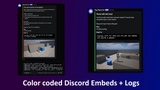
Choose from Error, Warning, Feedback, Bug Report, Feature Request, Information, and Question. Each type uses a different embed color in Discord, making incoming reports easier to sort at a glance.
• Built-in client-side rate limiting
Customizable client side rate limit timer. Additional reports aren't allowed until the rate limit time is up, preventing spam or malicious flooding.
• Webhook URL obfuscation
The webhook is stored using high level encryption, preventing it from being exposed in plaintext inside packaged builds.
• Instant teleport to bug locations
The embed includes the Bugitgo location, allowing you to copy/paste it directly into Unreal’s console to teleport to the exact position and rotation where the report was made.
• Multiplayer support
Each individual client (and client running as a listen server) can send their own reports.
• Generated User ID
Option to send a hardware based generated ID (or your own ID such as Steam or EOS) to help identify users without collecting personal information, allowing you to block problem players without them knowing.
• Log Files
Optionally includes the log file up to the current point for when the player has submitted the bug report.
• Save Game Files
Optionally includes the save game file/s when the player has submitted the bug report.
Optional Companion Discord Bot
Bug Reporter Bot is a free Discord bot to help manage the bug reports that come in. Just add the bot to your server and use the /bug_setup command to point it to the same channel you use for incoming reports.
It can also be self hosted if you prefer that instead. Check out the bot on Github here: https://github.com/hexnite-jpg/ue-discord-bug-reporter-bot/tree/main
Features:
Trello integration - Uses an emoji reaction to allow you to send a reported bug to Trello as a card.
Plugin integration - Automatically processes bug reports from the plugin.
Reaction-Based Workflow - Status updates via emoji reactions ( In Progress, Fixed, Won't Fix, High Priority)
Thread Organization - Auto-creates threads for each bug with all details and moves logs (if included) into the thread.
Clutter Cleanup - Resolving a bug will collapse it down to help declutter the channel, undoing the reaction will restore it.
Player Blocking - Block and unblock spammers by Player ID, the bot will automatically delete their posts.
Statistics - Track bug status and completion rates
My Bugs - See all your assigned bugs in a message only you can see.
Zero Database - All bug states stored and read back in Discord (reactions, threads, embeds)
Video with in game example:
https://www.youtube.com/watch?v=2LMxyS3DF8M
Discord Bot Link
https://discord.com/oauth2/authorize?client_id=1458822458588139734
Documentation
https://drive.google.com/file/d/1NNafqLjkhpV1fAZ6gOVlexUbeodfqSDC/view?usp=drive_link