


Description
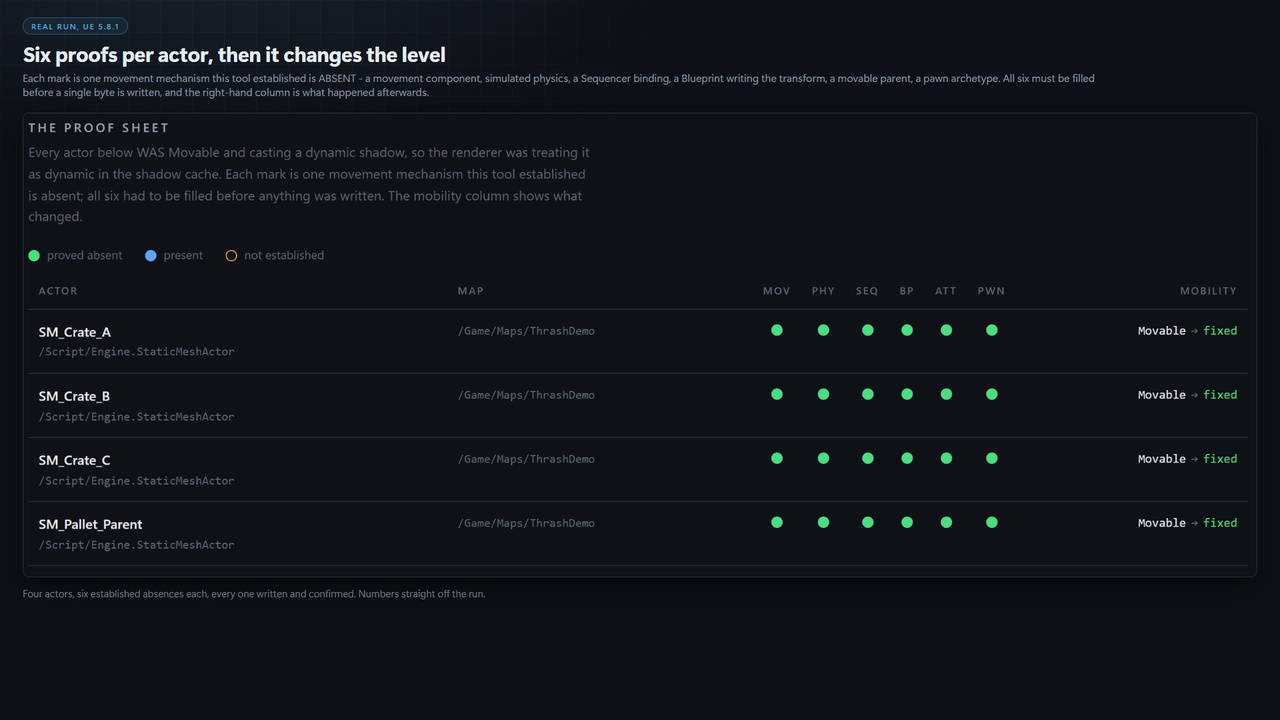
This product is a headless commandlet. It has no editor panel and no toolbar button, and the interface shown in the screenshots on this page is the proof sheet it writes: a self contained HTML file you open in any browser. That is deliberate: a tool that rewrites actors in a level you are going to ship has to run on a build machine and produce output a reviewer can diff.
Install. Copy the ShadowThrashFixer folder into your project's Plugins directory, so you have <YourProject>/Plugins/ShadowThrashFixer/. Restart the editor and accept the rebuild prompt. Confirm it is on in Edit > Plugins > Editor > Shadow Thrash Fixer, which is the only place this product appears in the editor.
Run the read-only scan. Close the editor. Open a command prompt in your engine's Engine\Binaries\Win64 folder and run this, substituting your own project path:
UnrealEditor-Cmd.exe "C:\Path\To\YourProject.uproject" -run=STF -unattended -nopause -nosplash
It writes no levels, so it is safe on any project.Read what it printed. Two lines near the end of the log name the files it wrote:
Plan written: ...\YourProject\Saved\ShadowThrashFixer\plan.json
Proof sheet written: ...\YourProject\Saved\ShadowThrashFixer\report.htmlOpen report.html in any browser. That page is the interface in the screenshots above. There is nothing to open inside Unreal.
Read a result in 60 seconds. Every row is one actor that was Movable and casting a dynamic shadow. The six marks are the six movement mechanisms this tool established were absent: MOV a movement component, PHY simulated physics, SEQ a Sequencer binding, BP a Blueprint writing its transform, ATT a movable parent, PWN a pawn archetype. All six must be filled before a single byte is written. Anything it could not establish is listed separately as a refusal, naming the exact signal that was missing. Read the refusals first.
When you want it to change the project, add -Apply for a dry run that re-proves every actor and still writes nothing, then -Apply -Execute to write, save and re-scan:
UnrealEditor-Cmd.exe "C:\Path\To\YourProject.uproject" -run=STF -Apply -Execute -unattended -nopause -nosplash
Run it on a clean source control tree and review the diff first.
What it is forA Movable actor that casts a dynamic shadow makes the renderer throw away its cached shadow page every time its transform changes. Most of them never move.
They were left Movable by an import default or during a blockout, and nobody went back. On a level built by several people over several months nobody can tell you which, and guessing is how you demote something that really does move.
Shadow Thrash Fixer finds every one of them, proves which cannot move, fixes the ones it can prove, and then re-scans to show the offending set is empty. Most tools here hand you a list to fix yourself. This one changes the project, then checks its own work with an independent second scan and reports that, not its own success count.
The part to judge it on is what it REFUSESThe dangerous failure is not missing an offender, which costs you nothing you were not already paying. It is demoting an actor that actually moves, which is a visible bug you will not connect to this plugin for days.
Anything it cannot prove, it refuses, naming the signal it could not establish. Before it will touch an actor it must establish that all of these are absent:
a movement component, on the actor or any child actor
simulated physics, read from the authored flag rather than the runtime body
a Sequencer binding, swept across every LevelSequence in the project
a Blueprint writing its transform
a movable parent, walked up the attachment chain
a pawn-like archetype
an unreadable native class, because its C++ could move it in Tick and that cannot be seen
Every signal is three-valued: established yes, established no, or unknown, and an unknown always refuses. That last row is why it uses an allow-list of native classes known to be inert, never a deny-list, which would silently admit every class nobody thought of.
Two repairs, and you chooseMark the shadow cache Static (the default) sets Shadow Cache Invalidation Behavior to Static on each primitive casting a dynamic shadow, the engine's own switch for suppressing invalidations caused by transform changes. It does not change Mobility, does not change whether anything casts a shadow, and needs no lighting rebuild.
Demote Mobility to Static (-Demote) is the deeper fix. A Static actor participates in baked lighting, so on a map whose lighting has not been rebuilt it can look worse until you rebuild.
It defaults to the narrow one. It will not silently change your map's lighting.
Two things it does not claim. It invents no per-actor invalidation counts, because the engine exposes those in aggregate only; it reports which actors are structurally responsible. And its sweeps cover event and function graphs and level sequence bindings, not every indirection. Where coverage is partial the report says so at the top.
Getting StartedThe first-time test above is the short version. Full switch list:
-Paths=/Game/A+/Game/B limit the scan to these content paths. Default /Game
-Plan=<file> where to write the plan JSON. Default Saved/ShadowThrashFixer/plan.json
-Report=<file> where to write the proof sheet. Default Saved/ShadowThrashFixer/report.html
-Apply re-prove every planned actor. Writes nothing without -Execute
-Execute with -Apply, actually write and save. Destructive
-Demote demote Mobility to Static instead of marking the shadow cache static
-Budget=N fail with exit 1 when more than N actors are provably still and unfixed
-help print this list
Exit codes: 0 ok, 1 over budget, 2 failed, 3 bad arguments. Add -Budget=0 to a build step once a level is clear and a regression fails the build with nobody opening the editor.
Technical InformationInterface: Headless commandlet only. No editor panel, no toolbar button and no console command. Its output is the generated HTML proof sheet and the JSON plan.
Renderer and materials: This plugin ships no materials, no meshes and no content assets of any kind. It is C++ only and therefore renderer agnostic, behaving identically under DirectX 12, DirectX 11 and Vulkan. If your project uses Substrate, Substrate itself requires Default RHI to be set to DirectX 12 in Project Settings; that is a requirement Epic places on your project, and this plugin neither introduces it nor changes your renderer settings.
Features:
Proves, per actor, that seven independent movement mechanisms are absent before it will write
Three-valued logic throughout; an unknown always refuses
Two repairs: mark the shadow cache Static (default, no lighting rebuild) or demote Mobility to Static
Dry run by default; -Execute without -Apply is refused rather than interpreted
Machine-readable JSON plan beside the report, stamped with a predicate version the apply pass verifies
An independent proving re-scan after every write pass
Complete, readable, unminified C++ source
Code Modules: ShadowThrashFixer (Editor, Default loading phase)
Number of Blueprints: 0
Number of C++ Classes: 16 declared in the module's public headers (2 classes, 9 structs, 5 enums; engine forward declarations excluded)
Network Replicated: No. This is an editor-time tool and contributes nothing to a packaged runtime build.
Supported Development Platforms: Windows
Supported Target Build Platforms: Win64
Documentation: https://github.com/onefreeman1337/csaf-releases/blob/main/docs/shadow-thrash-fixer/README.md
Example Project: Not included. The plugin operates on your own levels and needs no sample content. Run the read-only scan from the first-time test against any existing project and it produces its proof sheet and plan without changing anything.
Important / Additional Notes:
Unreal Engine 5.8 only. This is the sole engine the plugin has been built and verified against, and the sole version claimed.
Works on standard levels and on World Partition. Unloaded World Partition actors cannot be inspected, so they are reported as unloaded rather than clean; the report distinguishes the two.
No third-party software is included. Every module it links is an Epic Games engine module.