Descrição
Widget Designer Utilities
Adds color-coding, batch rename, binding performance warnings and widget extraction tools to the UMG Widget Designer hierarchy, making it easier to visually identify and organize widgets in complex UI layouts.
The Problem
The UMG Widget Designer hierarchy is a plain white tree where every VerticalBox, HorizontalBox, and Button looks identical. In complex layouts with dozens of nested panels, finding the right widget becomes a frustrating scroll-and-guess exercise. Duplicating widgets leaves you with unhelpful _1, _2, _3 suffixes. Property bindings — a common performance trap — are completely invisible in the hierarchy. And extracting a group of widgets into a reusable Widget Blueprint requires tedious manual copy-paste and cleanup.
The Solution
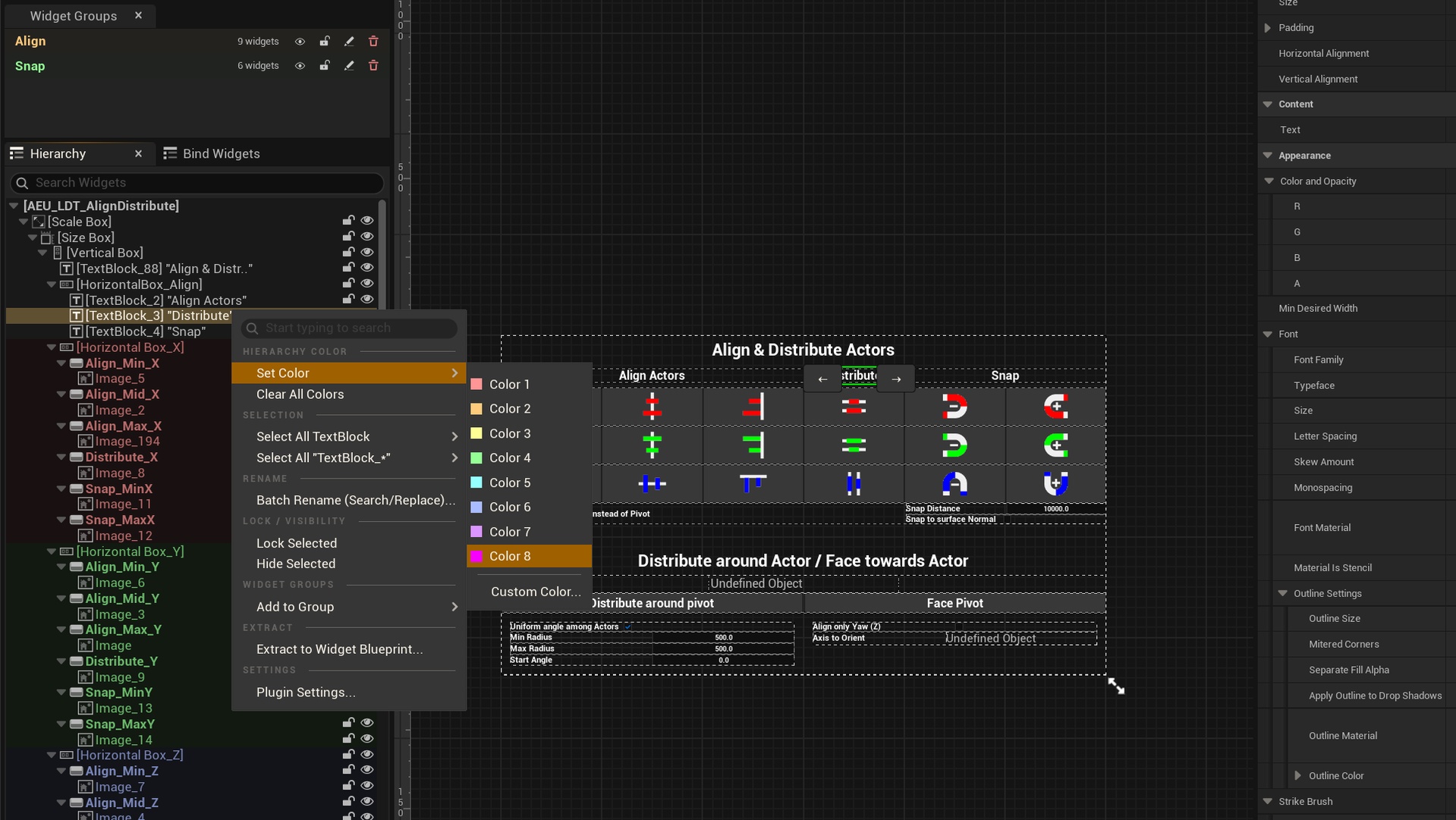
Widget Designer Utilities adds a context menu (Middle-Click or configurable key) directly in the UMG hierarchy that provides color-coding, batch operations, performance warnings and extraction tools — without modifying the engine.
Hierarchy Color-Coding
Quick color presets — Middle-click and pick from customizable preset colors in one click
Custom color picker — Full color picker for any color you need
Background and/or text — Choose background tint, text color, or both (configurable)
Adjustable opacity — Control background intensity with a slider
Multi-selection — Apply or clear colors on multiple widgets at once
Per-asset storage — Colors saved inside the .uasset, no external files or config to manage
Rename-resilient — Colors survive display name changes and auto-transfer on variable renames
Auto cleanup — Orphaned colors from deleted widgets are purged automatically
Binding Performance Warnings
Automatic detection — Widgets with property bindings get their icon tinted orange
Detailed tooltip — Hover to see which properties have bindings and how many
Zero setup — Works on every Widget Blueprint you open, no configuration needed
Configurable — Change the warning color or disable entirely from settings
Batch Rename (Search/Replace)
Find and replace — Search text in widget names and replace across all selected widgets
Strip numeric suffix — Removes _1, _2, etc. automatically (perfect after duplicating)
Real variable rename — Updates the actual variable name, not just the display label
Rename validation — Invalid renames are skipped safely, no crashes
Extract to Widget Blueprint
One-click extraction — Select widgets, choose "Extract to Widget Blueprint...", pick name and class
Parent class picker — Choose UUserWidget or any custom subclass
Deep copy — Uses the engine's copy/paste for proper widget cloning with no broken references
Same-parent validation — Only available when all selected widgets share the same parent
Batch Implement Events
Implement multiple widget events in two clicks — Stop going back and forward from the designer to the graph, select all the widgets you want to affect, check he events and implement them in one click
Fully Configurable
All settings in Editor Preferences > Plugins > Widget Designer Utilities:
Remappable mouse button and keyboard shortcut
Modifier keys (Ctrl/Shift/Alt)
Text color, background color, background opacity toggles
Binding warning color and toggle
Customizable color presets array
Live Hierarchy Preview showing how settings look
Documentation & bug reports?