Description
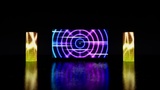
Stage LED walls built from cabinets — per-cabinet flip / dissolve transitions, kinetic motion, curved, cylinder and cut-out shapes, and frame-exact image-sequence playback, all keyable in Sequencer.
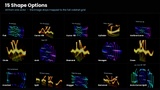
LED Stage FX builds stage LED walls out of cabinets, the way real touring screens are built. The whole wall shows one continuous image, every cabinet can flip, pop or dissolve on its own timing, blocks of cabinets can lift, slide, spin, fold open or ripple like kinetic screens, and the wall itself can curve into an arc, wrap into a cylinder or be cut into circles, arches and towers. Image sequences play frame-exact. Everything is driven by values you key in Sequencer, so scrubbing, playback and Movie Render Queue always give the same picture. No DMX and no Media Framework required.
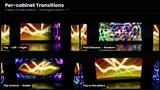
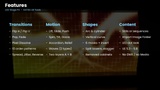
Transitions (Content A → B)
5 types: Flip Horizontal, Flip Vertical, Pop, Fade, Pixel Dissolve
10 order patterns: Left/Right, Top/Bottom, Radial Out/In, Diagonal, Spiral, Checker, Random
Spread (all at once → one by one), Jitter, Reverse, Ease, Edge Shade
One Progress value 0 → 1 runs the whole transition
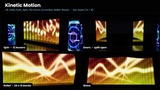
Kinetic motion (two layers, Motion A + Motion B)
10 types: Lift, Slide, Push, Spin (louvers), Tilt, Doors, Accordion, Relief (3D depth by pattern), Wave Depth, Wave Up/Down
Split the wall into blocks (Segments X / Y), choose the pivot, order and stagger
Motion B is applied inside Motion A: lift the whole wall while every block spins
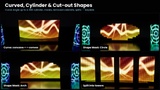
Shapes
Curve Angle: concave / convex arcs up to a full 360 cylinder (keyable morph from flat)
Vertical Curve, Shape Masks (Circle, Diamond, Triangle, Arch, Hexagon, Cross, Invert), Removed Cabinets
Split into towers every N columns / rows with a gap, Stagger Rows (brick)
The image stays mapped to the full grid, so cut-outs and gaps crop the picture like a real LED screen
Content
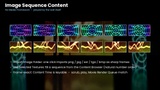
Still images or image sequences (png / jpg / exr / tga / bmp) played frame-exact by Content Time
Import Image Folder: one button imports a whole folder as sharp frames (no mips, no streaming) and assigns them
Use Selected Textures: fill a sequence from the Content Browser selection (natural number order)
LED look: visible LED dots (Pixels Per Cabinet, Dot Strength), Brightness
Sequencer
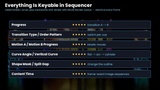
Every setting is keyable: Progress, transition type and order, Motion A/B, Curve Angle, Shape Mask, Split gaps, Content Time
Deterministic: scrub, play backwards, render with Movie Render Queue — identical every frame
Preview buttons in the Details panel: Play Transition, Play Motion A/B, Return Motions
Documentation
Manual (PDF, English / Japanese): https://drive.google.com/file/d/1RQFXGKIy4S4X-pUmPLjhrlk9kYsDp6_a/view?usp=sharing