
Description
Find performance risks. Apply supported optimizations. Measure the results.
Stone Doctor by StoneMocap brings environment diagnostics, optimization tools and project cleanup into one Unreal Engine Editor dashboard. Built for environment artists and developers working on detailed scenes and open worlds, it helps turn scattered asset settings into clear, actionable findings.
PERFORMANCE YOU CAN SEE
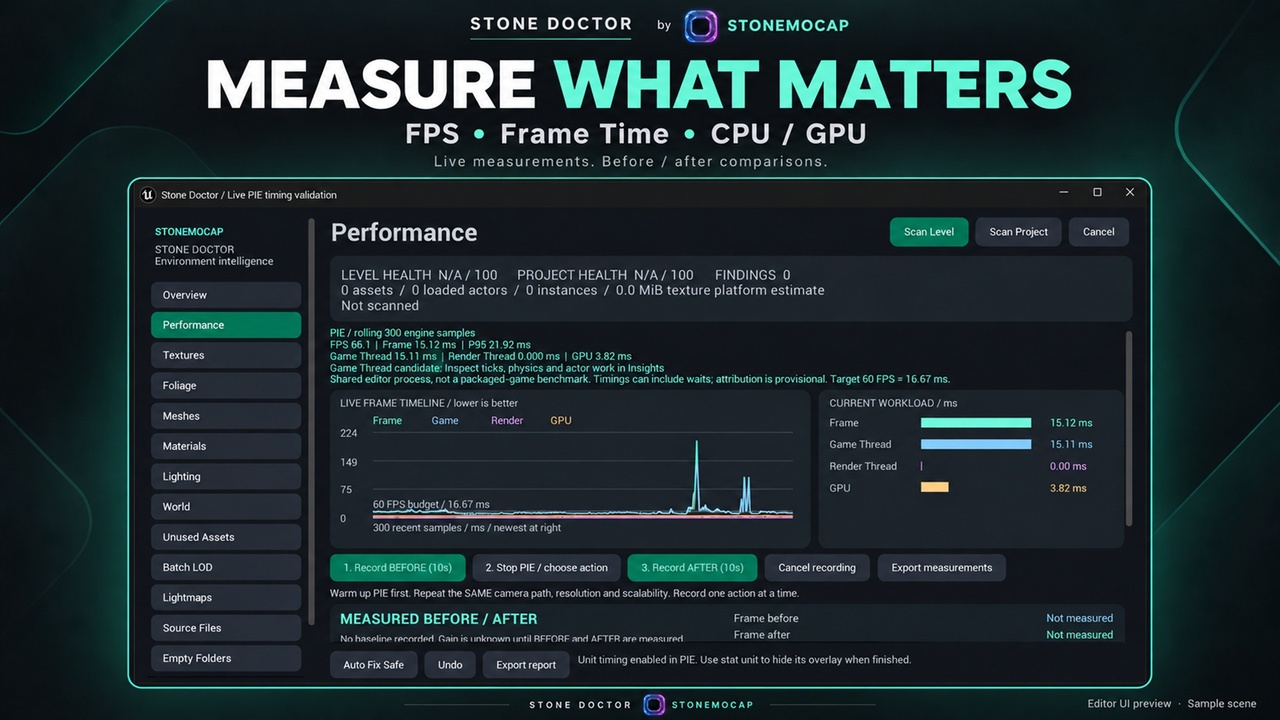
Track live FPS, frame time, Game Thread, Render Thread and GPU timing where available. Record before-and-after measurements and compare charts to evaluate the effect of your changes.
ENVIRONMENT DIAGNOSTICS
• Textures: inspect large resolutions, mipmaps, streaming, compression and estimated platform texture memory.
• Foliage: review instance counts, cull distances, shadows, WPO and collision risks.
• Meshes: identify dense conventional geometry, missing LODs, Nanite candidates and repeated mesh usage.
• Materials and lighting: identify material feature risks, texture-sample indicators, translucency, WPO and movable shadow lights.
• World analysis: review loaded actor density, instancing opportunities and HLOD/World Partition indicators.
ONE-CLICK OPTIMIZATION
“Optimize this environment” runs a fresh scan and automatically applies supported texture, foliage, light-shadow, LOD and baked-lightmap actions. Results clearly separate applied changes, failed actions and recommendations requiring manual work.
BATCH EDITING
Generate three reduced LODs for eligible non-Nanite meshes without replacing existing LOD chains. Review world-size-based lightmap resolution suggestions and apply per-component overrides in supported baked-lighting scenes.
PROJECT CLEANUP
Review unreferenced mesh, texture and material asset candidates. Scan supported FBX/OBJ and other source files in Content and SourceAssets, protect recorded reimport sources, and find genuinely empty folders. Reviewed deletions create verified backups.
LOCAL ASSISTANT
Get explanations based on your scene findings without an API key or internet connection. The assistant uses local rules rather than an online language model.
CONTROL AND RECOVERY
Optimization changes remain unsaved and support Unreal transactions/Undo. File and folder deletions use backup restoration instead of Undo.
TECHNICAL DETAILS
• Windows Editor plugin.
• Tested with Unreal Engine 5.8.3.
• Full C++ source and documentation included.
• Verified with 15 automated Editor tests.
Performance gains depend on the scene and hardware. Optimization can affect visual quality and should be checked in your project. World Partition analysis covers loaded actors/cells. Material analysis uses graph indicators, not compiled shader instruction measurements. Cleanup candidates require review because dynamic or external usage cannot be fully detected.