
Description
Discord-https://discord.gg/bgsWWJaBV3
Documentation-https://darksaintgames.com/documentations/reboot/docs/
Restart, reload, and reset your Unreal Editor from a single button right next to Play — with safe, confirm-first guards so you never lose work.
Stop wrestling your editor back into a clean state.
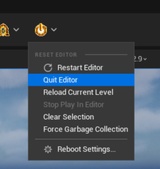
Reboot adds one smartly-guarded button to the Level Editor toolbar, just left of Play. Click it and you get an instant menu of one-shot editor resets — so you can recover from a sluggish session, a confused hot-reload, or a cluttered viewport without digging through menus or fully relaunching by hand.
It's the little quality-of-life tool you reach for a dozen times a day and never think about again.
Everything one click away:
Restart Editor — relaunch Unreal and reopen your current project (prompts to save first).
Quit Editor — a graceful, save-first shutdown.
Reload Current Level — revert the open level to its last-saved state on disk in seconds.
Stop Play In Editor — end the active PIE/SIE session (auto-disabled when you're not playing).
Clear Selection — deselect every actor and BSP surface at once.
Force Garbage Collection — reclaim unreferenced memory instantly when the editor feels heavy.
Safe by default, yours to shape:
Destructive actions (Restart, Quit, Reload) confirm first and prompt to save — and every confirmation is independently toggleable.
Show only the actions you use. Each menu entry can be hidden from a clean settings page for a tight, personal dropdown.
Settings are stored per-user, per-project, so everyone on the team keeps their own layout.
Zero footprint on your game. Reboot is an editor-only plugin — it's automatically excluded from packaged, Game, Server, and Client builds and adds nothing to your shipped product.
Install it, and your toolbar just got a lot more reassuring.