الوصف
May Popup System - Ultimate Popup and Notification Solution for Unreal Engine [Version 1.0.1 - Hotfix]
🔗LINKS TO CHECK OUT 👇
Video Tutorial (Coming Soon)
Introduction
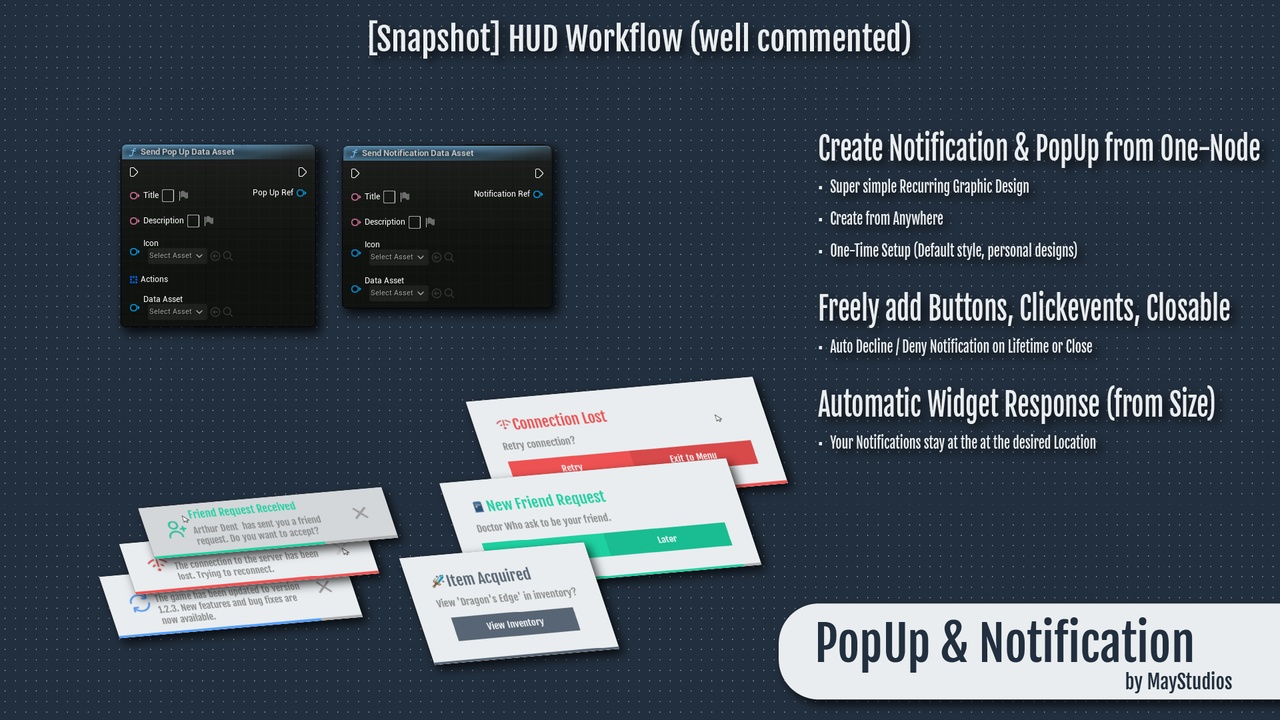
Introducing May Popup System, your all-in-one solution for creating dynamic popups and notifications in Unreal Engine. Designed with ease of use and flexibility in mind, this Blueprint-based system empowers developers to integrate customizable and visually appealing notifications and popups into their projects with minimal effort. Whether you're building a game, an application, or an interactive experience, May Popup System offers the perfect blend of functionality and simplicity to keep your users informed and engaged.
Features and Benefits
Fully Customizable Popups and Notifications: With May Popup System, you can create a wide variety of popups and notifications that suit your project’s needs. Choose from default settings or create your own themes, colors, and sounds to match your project's aesthetics.
Easy-to-Use Settings Menu: The system includes a comprehensive settings menu where you can configure default widgets, themes (e.g., Dark, White, or custom themes), color types, and sound effects for notifications, clicks, and close actions.
Pre-configured Types and Themes: Get started quickly with pre-configured notification types like Default, General, System, Friend System, Warning, and Error. These types come with associated colors, icons, and sounds that you can modify or override as needed.
Example File Included: To help you hit the ground running, May Popup System comes with an example file showcasing various use cases, from basic popups to advanced notification setups. This demo project is available as a downloadable package for easy testing and integration.
Dynamic Widget Customization: Create and manage widgets that pop up anywhere on the screen, with customizable title text, descriptions, icons, and buttons. You can also control the duration of notifications, making them persistent or timed with a progress bar display.
Interactive Notifications: Make your notifications more interactive by allowing them to respond to user actions. Notifications can be made clickable, with corresponding actions triggered upon interaction.
Patch Node List
Version 1.0.0 - Initial Release
The initial release of the May Popup System includes the following features:
Set Popup Title: Allows you to configure the title text for popups.
Set Popup Description: Provides the option to set the description text for popups.
Set Popup Icon: Enables you to choose the icon displayed on the popup.
Set Popup Buttons: Lets you define the buttons, such as OK or Cancel, displayed on the popup.
Set Popup Duration: Controls how long the popup is visible; setting it to 0 makes the popup persistent.
Trigger Popup: Allows you to launch the configured popup on the screen.
Close Popup: Enables manual or programmatic closure of the popup.
Set Notification Type: Allows you to choose the type of notification, such as Warning or Error.
Set Notification Sound: Lets you set the sound effect for the notification.
Set Notification Theme: Provides options to choose or customize the theme for the notification.
Version 1.0.1 - Hotfix (Current Version)
The hotfix version 1.0.1 introduces the following improvements and fixes:
Mouse Cursor Visibility: Added functionality to show the mouse cursor whenever a popup or notification is visible. The cursor will automatically disappear once no popups or notifications are visible.
Auto-Add Notification Panel: The May Popup System now automatically detects if the notification panel is missing and will add it to the project to ensure proper functionality.
Versions: I'll expand support to include all Unreal Engine versions from 5.0 to 5.4, not just 5.4.
Future Version 1.0.2 - Planned Features
Looking ahead to version 1.0.2, the following features are planned:
Mouse Cursor Settings: Add settings that allow developers to customize mouse cursor behavior, including when and how the cursor should appear or disappear during popup and notification events.
Advanced Popup Animations: Introduce additional animation options for popups, such as entrance and exit animations.
Notification Queuing System: Implement a queuing system to handle multiple notifications in sequence, ensuring that each notification is displayed without overlap.
Credits
This asset pack includes sound effects sourced from the following sets created by Kenney Vleugels (Kenney.nl):
UI SFX Set
Interface Sounds (1.0)
These sound effects are licensed under the Creative Commons Zero (CC0) license, which allows for free use in personal, educational, and commercial projects without any restrictions.
While it is not required, if you wish to support the creator, you can donate at Kenney's support page or follow Kenney on Twitter for updates and more resources.
Visit www.kenney.nl for more high-quality assets and information.