






Description
📺 Watch an old promo video: v0.1 | 📺 Updated video: v0.2 | 📽 Updated video: v0.5 | 👨🏫 Comprehensive tutorial: v0.5 | 📗 Read the manual. | 📘 Read the changelog. | 📙 Read the original v0.1 GitBook docs. | 🆓 Check out the Core open-source version. | 👷♂️ Contact me for custom integration / implementation.
I recommend that you check out the functional & capable Core open-source version before committing to the Pro Fab version.
🔊 Sonant
Native Contextual Audio Manager for Unreal Engine 5
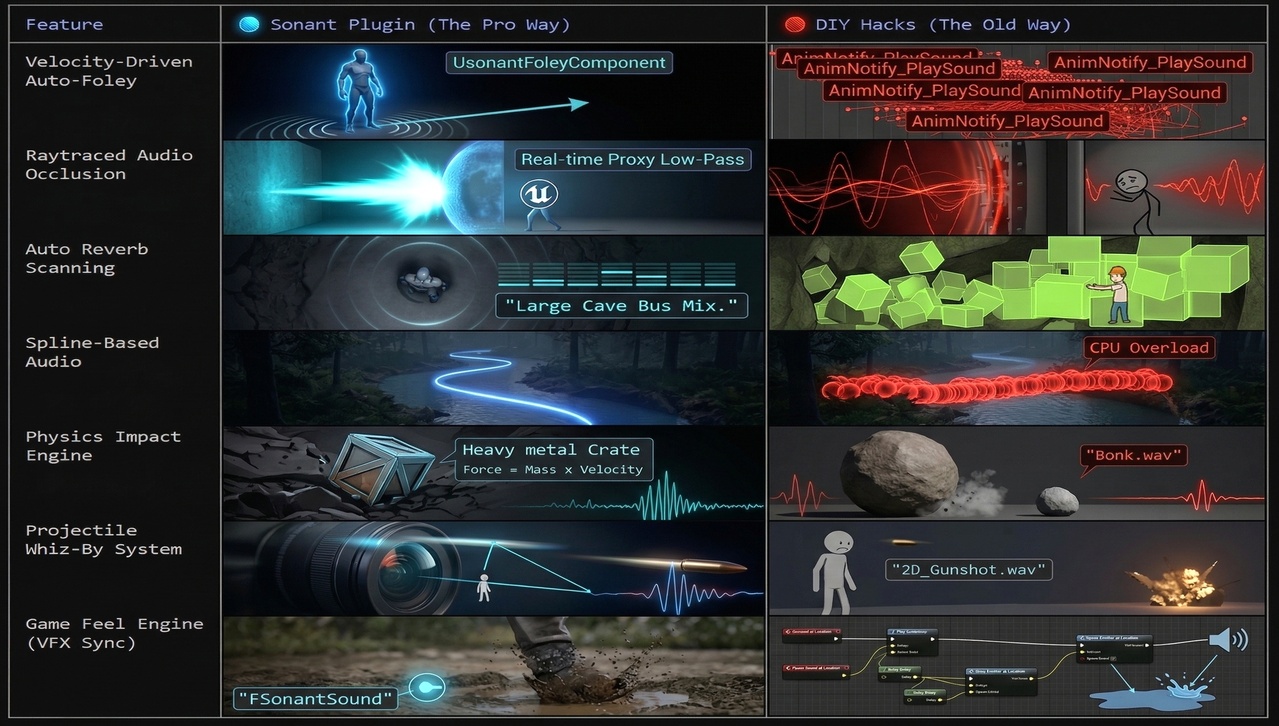
Sonant (0.5.1) replaces scattered audio logic with a unified, data-driven pipeline. From physically accurate footsteps to dynamic room estimation, Sonant handles the complexity so you can focus on the soundscape.
✨ Features
🎯 Contextual Surfaces
Automatic surface detection via material names, physical materials, or per-face collision
GameplayTag-driven events - Define any audio event (Walk, Run, Land, Impact)
Smart caching - O(1) material lookup after first hit
Sub-mesh support - Different sounds for different parts of complex meshes
💥 Physics Impact System
Automatic intensity detection based on impact force
Light/Medium/Heavy categorization with configurable thresholds
Pitch and volume scaling based on physics properties
Micro-collision filtering - Eliminates jitter noise
🌊 Auto Reverb Estimation
6-direction raycasting (Up/Down/Left/Right/Forward/Back)
Room size calculation with configurable presets
Dynamic Control Bus Mix activation
2Hz update rate for optimal performance
🏔️ Atmosphere Zones
Priority-based mixing - Higher priority zones override lower ones
Reference counting - Proper handling of nested zones
Smooth transitions via AudioModulation
Volume component for easy zone setup
🚀 Quick Start
Prerequisites
Unreal Engine 5.6+
AudioModulation plugin enabled
Download the latest release
Copy Sonant folder to YourProject/Plugins/
Restart Unreal Editor
Basic Setup
1. Create Configuration Asset
Content Browser → Right Click → Miscellaneous → Data Asset → SonantConfig Name: DASonantConfig
2. Configure Surfaces
Surface | Keyword | Sound | Event |
🌱 Grass Grass Sonant.Event.Footstep
🔩 Metal Metal Sonant.Event.Footstep
🪨 Stone Stone Sonant.Event.Footstep
🪵 Wood Wood Sonant.Event.Footstep
🪟 Glass Glass Sonant.Event.Footstep
3. Register in Project Settings
Edit → Project Settings → Plugins → Sonant Audio Main Config: DASonantConfig
4. Add Required GameplayTags
Project Settings → GameplayTags: - Sonant.Event.Footstep - Sonant.Event.Impact.Light - Sonant.Event.Impact.Heavy - Sonant.Atmosphere.Outdoor - Sonant.Atmosphere.Cave - Sonant.Atmosphere.Underwater
That's it! You're ready to use Sonant.
🎮 Included Demo
Sonant comes with a comprehensive demo system that showcases all features without requiring custom audio assets.
✦ Disclaimer: this plugin assumes a working knowledge of UE5 workflows, editor tooling, asset setup and so on. Custom integration, extension or modification may also require comfort reading and writing C++. If you are new to UE5 or plugin-based development, expect a learning curve. Before purchasing the Fab version, it is recommended that you explore the open-source GitHub version and the online manual first to understand the architecture, setup requirements, and integration style. This will help you determine whether the plugin fits your project and experience level.