



Beschreibung
Your rename didn’t happen yet
You did what the docs say: added [FormerlySerializedAs("oldName")] and renamed the field. Everything still works. Every value is still there. And nothing has migrated. The attribute is a load-time fallback — the old key is still physically written in your scenes, prefabs and assets, and Unity quietly remaps it on every load.
So the attribute becomes permanent scaffolding. Delete it — because it looks redundant, because your IDE offers to, because the rename was two years ago — and every value that never re-saved is gone. Silently. No error, no failed import.
"the actual asset file still holds the old field names! … if I now follow the official step and remove the now-supposedly-useless [FormerlySerializedAs] attributes, the values are lost." — Unity Discussions, a developer following the official procedure.
Reserialize closes the loop
Finds every asset still holding an old key — every [FormerlySerializedAs] in YOUR assemblies, not the engine's.
Migrates it: force-reserialization, so the data physically moves.
Proves it: re-reads the YAML from disk and checks, per asset, that the old key is gone AND the value is byte-identical to what was there before.
Tells you it is safe to remove the attribute only when every row passed.
The part nobody else does: prefab variants
A prefab variant stores an overridden field as a propertyPath STRING naming the OLD field — where a key search never looks. A variant's PrefabInstance document has no m_Script line at all, so a GUID-based index misses every variant in the project. And Unity's own force-reserialization does not rewrite override paths: follow the documented procedure to the letter, remove the attribute, and every variant override is destroyed.
Reserialize indexes by reference closure instead, repairs those override paths with the narrowest possible edit, then re-reads the file and proves it like everything else. No row is ever marked proven because we wrote it — only because reading it back said so.
Built to be distrusted
It reads bytes, not objects — only the serialized text can prove a migration happened.
A run that finds nothing does not report success: the counts of what was examined sit beside the verdict, always.
Honest amber: a value shape it cannot compare verbatim is reported unproven, never passed.
Renames with zero affected assets are listed too, not hidden.
Ships with a CI gate
A batch-mode entry point (CSAF.Reserialize.ReserializeCI.Verify) writes a JSON report leading with safeToRemoveAttributes. Exit 0 clean, 1 work outstanding or unproven, 2 could not analyse — "we could not measure" never shares an exit code with "we measured and it was fine".
Requirements
Unity 6 — built, compiled warnings-as-errors and test-run on 6000.5.7f1, which is the only version verified and therefore the only one claimed. Force Text asset serialization. Full C# source. Nine of the ten scripts sit in a named Editor-constrained assembly definition, so the tool itself can never enter a player build; the tenth is the demo scene’s sample component, in its own separate runtime assembly you can delete outright. No Resources folder, no runtime cost. Includes a demo scene and 21 EditMode tests.
Installation
In Unity, choose Assets > Import Package > Custom Package...
Select Reserialize.unitypackage and click Import, leaving every item ticked.
Everything lands under Assets/CSAF/Reserialize/. Nothing is installed anywhere else, and there is no Resources folder, so nothing is added to your build.
Getting Started - how to launch it
Open the main window from the menu: Window > CSAF > Reserialize
Window > CSAF > Reserialize
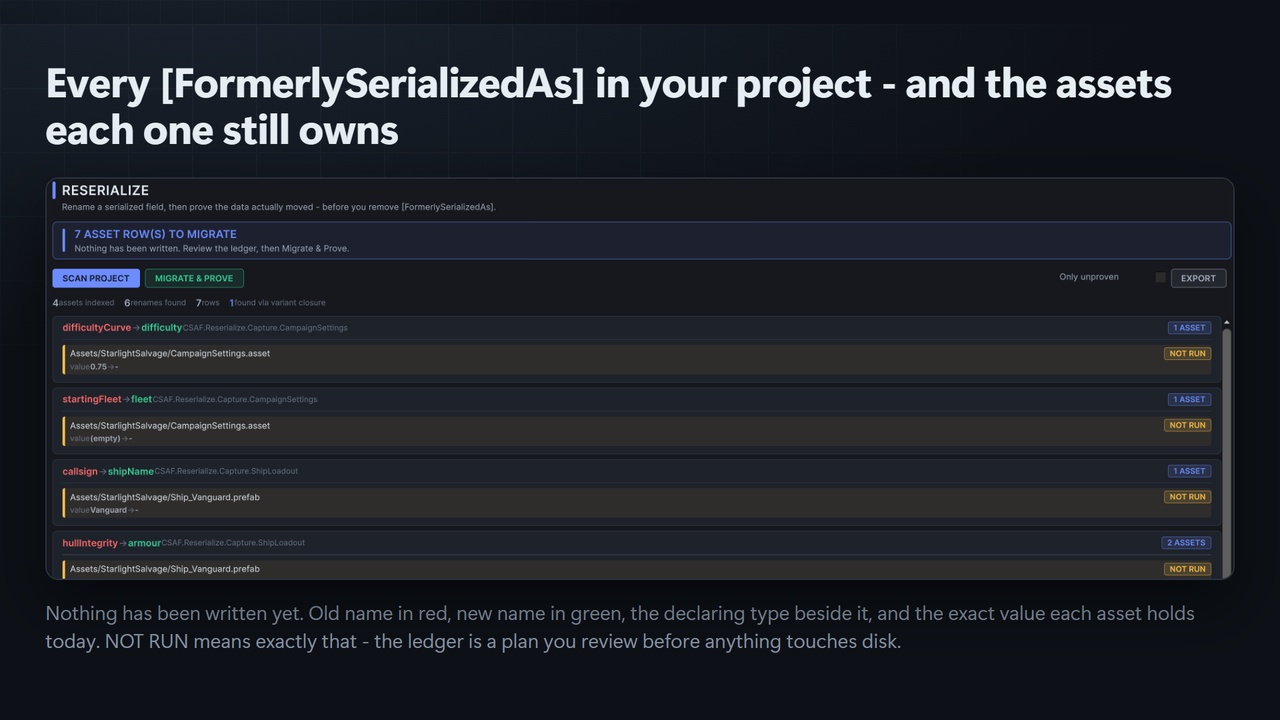
Press Scan project. It finds every FormerlySerializedAs in your code and every asset still holding an old key. The scan is read-only - nothing is written.
Review the ledger. Rows are grouped by rename; anything unproven sorts to the top. Every file that will be touched is listed before anything is written.
Commit or stash first. The next step rewrites asset files on disk and is not undoable from the Edit menu.
Press Migrate and prove. Reserialize rewrites the affected assets, re-reads them off disk, and fills in the proof column.
The banner turns green only when every row is PROVEN. If it does not, the rows that stopped it are named, with the reason.
Now remove the attributes.
Prerequisite the tool checks for you: Project Settings > Editor > Asset Serialization > Mode must be Force Text. A binary or mixed project cannot be read as YAML, so nothing can be proven about it - Reserialize reports that and refuses to grade the run rather than passing it.
Try it without touching your own project: open Assets/CSAF/Reserialize/Demo/ReserializeDemo.unity and press Play for the in-scene guided tour. The demo ships deliberately un-migrated, so it is a live example of the defect. Then open Window > CSAF > Reserialize and press Scan project - the demo rows appear immediately.
Using it in CI (headless)
Unity.exe -batchmode -quit -projectPath <project> -executeMethod CSAF.Reserialize.ReserializeCI.Verify -reserializeReport artifacts/reserialize.json
Unity.exe -batchmode -quit -projectPath <project> -executeMethod CSAF.Reserialize.ReserializeCI.Migrate -reserializeReport artifacts/reserialize.json
Exit 0 = clean. Exit 1 = work outstanding, or a row could not be proven. Exit 2 = the project could not be analysed at all (binary serialization, or assets not readable as text).
Technical Information
Features: finds every asset still holding a renamed field's OLD serialized key, force-reserializes it, then re-reads the YAML off disk and proves per asset that the old key is gone and the value is unchanged; handles prefab variants, variants of variants, nested prefabs and the scenes holding them via a reference-closure index rather than a key search; a designed migration ledger with four honest states (PROVEN, AT RISK, UNPROVEN, NO CHANGE); refuses to report success on a run that examined nothing; batch-mode CI gate with three distinct exit codes and a JSON ledger export.
Code Modules: CSAF.Reserialize.Editor (assembly definition, includePlatforms Editor) and CSAF.Reserialize.Demo (runtime assembly definition, demo scene only).
Number of .cs Scripts: 10
Supported Development Platforms: Windows
Supported Target Build Platforms: All - editor-only tooling that ships nothing into a build. The Editor assembly definition carries includePlatforms Editor, so it cannot enter a player build. The single runtime script is the demo scene's sample component, in its own separate assembly you can delete outright.
Supported Unity Pipelines: Built-in, URP, HDRP and custom SRPs. No pipeline coupling - the tool references only UnityEditor/UnityEngine and reads serialized text.
Dependencies: None. No Asset Store package dependencies and no third-party libraries - both shipped asmdef files declare an empty references array.
Documentation: the release page linked below, plus Readme_for_Users in the download and Readme inside the imported folder.
Example Project: Yes - a demo scene at Assets/CSAF/Reserialize/Demo/ReserializeDemo.unity, in its own runtime assembly definition, shipped deliberately un-migrated so it demonstrates the defect.
Versioning: 1.0.0
Support: [email protected]
Minimum Unity version: Unity 6, built and verified on 6000.5.7f1.
Full documentation: https://github.com/onefreeman1337/csaf-releases/blob/main/docs/reserialize/README.md — Support: [email protected]