
Description
NexxBatch | Batch Edit for Blueprint Variables -Documentation
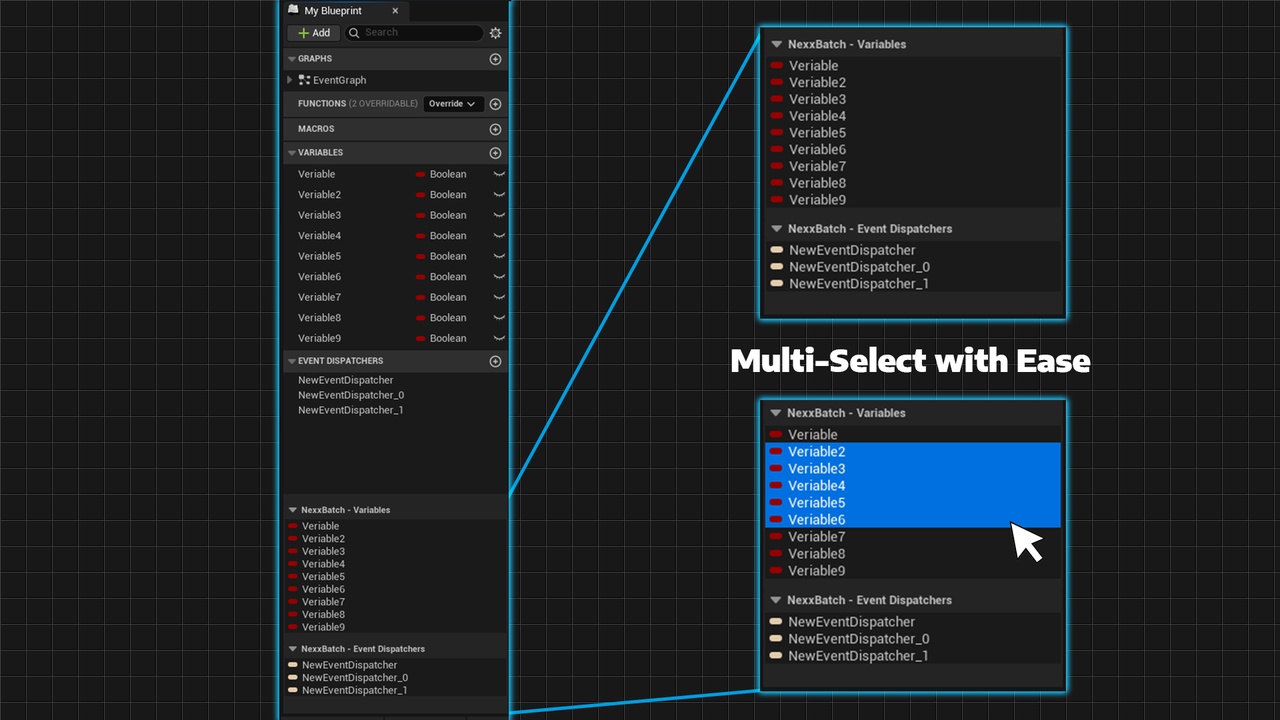
Managing dozens of Blueprint variables one by one slows down your workflow.
NexxBatch allows you to multi-select variables and modify their properties simultaneously directly inside Unreal Engine.
No extra windows.
No complicated setup.
Just faster Blueprint development.
🎯 Key Features
CTRL / SHIFT multi-selection support
Batch edit multiple variables at once
Modify Instance Editable, Expose on Spawn, Replication settings simultaneously
Quickly adjust Category and Variable Type
Works with:
Actor
Pawn
Character
Player Controller
Game Mode
Actor Component
Scene Component
Level Blueprint
⚡ How It Works
When you open a supported Blueprint type, NexxBatch activates directly below the standard My Blueprint panel.
Select two or more variables, and the default Details panel automatically switches to Batch Edit mode allowing you to apply changes across all selected variables instantly.
💡 Who Is It For?
Developers working on large Blueprint systems
Technical designers managing complex variable structures
Teams that value clean organization and fast iteration
Anyone who wants to eliminate repetitive variable editing
Contact: [email protected]