
Descrizione
- Build atmospheric, low-poly retro horror environments with modular assets -
- PS1/PS2-Era Retro Survival Horror Asset Pack -
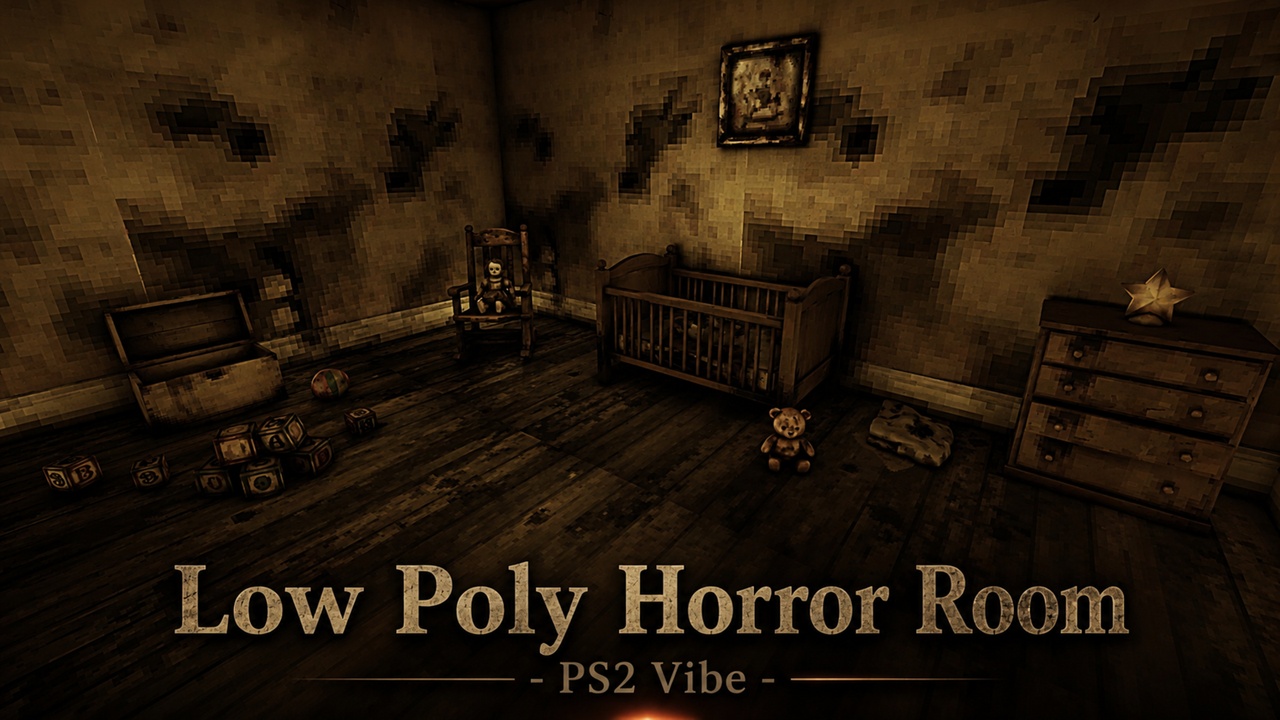
The Retro Horror Kids Room provides the essential elements needed to construct unsettling, decayed nursery environments. Featuring low-poly geometry, point-sampled textures, and a custom post-processing pipeline, this pack is designed for developers aiming to reproduce the classic, nostalgic aesthetic of late-90s and early-2000s survival horror games.
Instead of high-fidelity realism, this environment kit focuses on stylized atmospheric dread. It includes a modular wall system, weathered furniture, decayed toys, and interactive props. The pack also includes a fully assembled, pre-lit showcase level that demonstrates how the assets, lighting, and post-processing work together to establish tension.
26 Unique Low-Poly Static Meshes
Modular Wall & Architectural Pieces
Detailed Retro Furniture & Nursery Props
30 Custom Materials with Ambient Occlusion Maps
Configurable PS1/PS2 Dither & Posterize Post-Process
Pre-configured Showcase Level Included
"Designed within optimized retro constraints and paired with point-sampled textures, this pack delivers a cohesive late-90s survival horror environment directly inside Unreal Engine 5."
What Makes This Pack Different
While many modern horror asset packs focus on high-fidelity realism, this kit embraces the expressive limitations of classic retro hardware. By combining deliberate low-poly topology with point-sampled textures, it achieves an authentic retro feel without sacrificing runtime performance.
Additionally, it is a fully modular kit rather than a simple prop collection. The included architectural set allows you to easily assemble room layouts of various shapes and sizes, while the custom post-process material ties the scene together with adjustable dither, posterization, and color-crunch parameters.
How to Achieve the Retro Look
The classic survival horror look of this pack relies on two primary systems, both of which are pre-configured in the included demo level:
Texture Filtering: Textures are configured with point (nearest-neighbor) filtering at optimized resolutions, preserving sharp, pixelated details when viewed up close.
Post-Process Volume: A custom blendable post-process material is provided to handle dithering, posterization, and color desaturation. To apply this to your own levels, add a Post Process Volume, assign the included PS2 material as a blendable, and optionally lower your project's screen percentage to approximately 65%. Four exposed parameters allow you to adjust posterization levels, dither intensity, desaturation, and brightness.
Asset Breakdown
Static Meshes (26 Total)
Modular Architecture: Straight wall, inside corner, window wall, door-cutout wall, and functional door.
Furniture: Baby crib (with mattress and bedding), drawer unit, low bookshelf, rocking chair, and a toy chest.
Props & Decor: Teddy bear, porcelain doll, music box, alphabet blocks, play ball, books, framed pictures, wooden toy house, star-shaped nightlight, and window curtains.
Materials & Textures
Material Assets (30 Total): Custom materials mapped with Base Color, Normal, Specular, Ambient Occlusion, and hand-tuned roughness parameters.
Tileable Surfaces: Tiling materials for wooden floors and ceiling panels to easily extend the modular environment.
Retro Post-Process Material: Custom dither, posterization, and color-desaturation shader.
Technical Specifications
Nanite Compatibility: Meshes are imported with Nanite enabled. For platforms without Nanite support, standard fallback representations render automatically. Nanite can be disabled manually within each static mesh editor if desired.
Nanite Documentation: Epic Games Virtualized Geometry Guide
LODs: Standard mesh representations are highly optimized for retro-style performance.
Dependencies
To ensure compatibility with the tools used to configure these assets, enable the following built-in Unreal Engine plugin:
Go to Edit -> Plugins.
Search for and enable Modeling Tools Editor Mode.
Restart the editor.
No third-party plugins, external libraries, or paid dependencies are required.
Connect & Support
Email: [email protected]