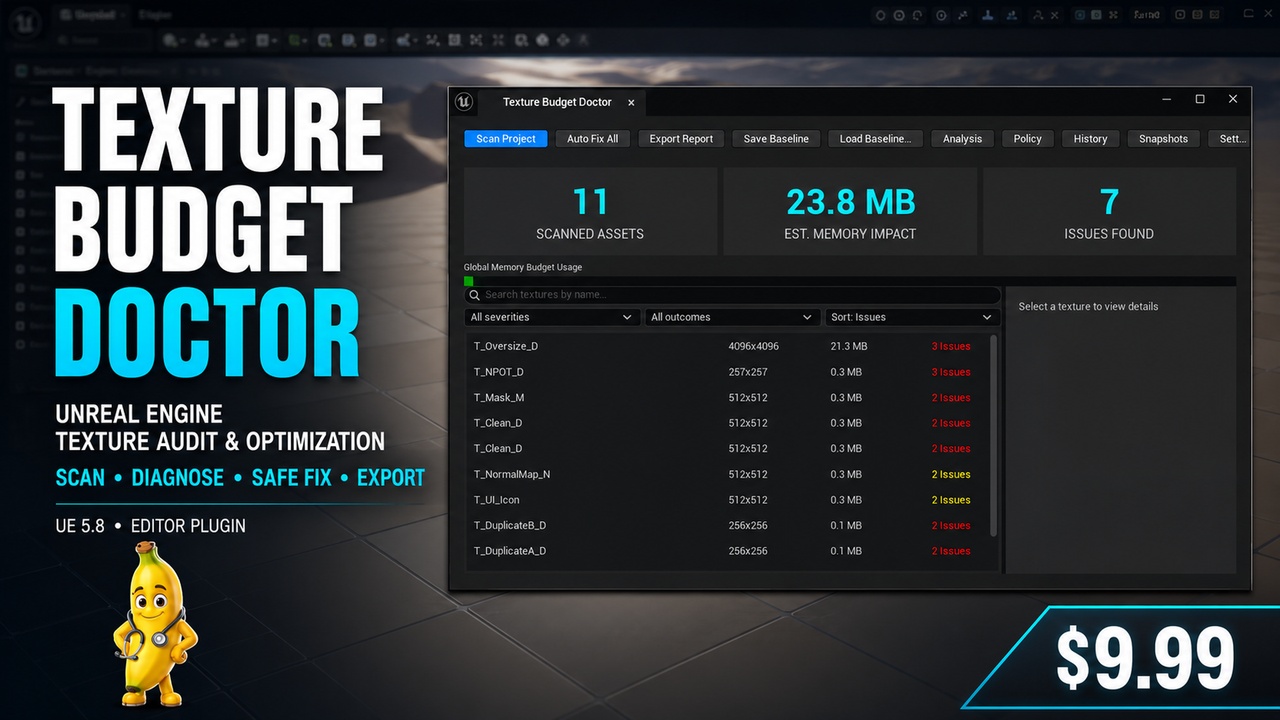
설명
Texture Budget Doctor started as an internal tool I created for my own Unreal Engine projects.
While working with larger environments, asset packs, and projects containing hundreds of textures, I kept running into the same problem: it was difficult to understand which textures were consuming the most memory, which settings were incorrect, and where optimization work would have the biggest impact.
Opening textures one by one quickly became slow, repetitive, and difficult to manage.
I wanted a clear answer to a simple question:
Which textures are actually hurting my project, and what can I safely do about them?
That is why I created Texture Budget Doctor.
After using, testing, and refining the tool in real projects, I decided to turn it into a complete Unreal Engine plugin and make it available to the wider development community.
Scan your project and find the textures that need attention
Texture Budget Doctor can scan:
selected textures;
complete Content Browser folders;
the entire project;
enabled project-plugin content;
imported and reimported textures through Import Guard.
The plugin creates a structured overview of your texture usage and helps identify the assets that deserve attention first.
Instead of manually checking hundreds of textures, you can quickly review:
estimated GPU texture memory;
current and projected texture budgets;
top memory offenders;
oversized textures;
missing or unsuitable mipmap settings;
incorrect compression settings;
unsuitable texture groups;
normal-map configuration problems;
non-power-of-two dimensions;
unnecessary Never Stream settings;
duplicate source textures;
potentially unused textures;
material sampler compatibility risks;
texture-set inconsistencies;
platform-specific effective resolutions;
project policy violations.
Texture Budget Doctor uses estimated GPU memory values to help you compare assets and identify optimization opportunities. Actual runtime memory usage may vary depending on the target platform, streaming state, Device Profiles, pixel format, virtual texturing, and runtime behavior.
Safe optimization with full control
Texture Budget Doctor is designed around a careful and transparent workflow.
Before applying supported fixes, you can review every proposed change individually.
The Auto Fix workflow displays:
the affected texture;
the property being changed;
the current value;
the proposed value;
the rule that generated the recommendation;
confidence level;
estimated impact;
material compatibility information;
read-only and source-control state.
You can select or exclude individual changes before applying anything.
Unsafe or advisory recommendations are not automatically selected.
Bulk fixes require a persistent snapshot before any texture settings are modified. Snapshot creation is validated before the operation continues, and the entire process is aborted if the snapshot cannot be created safely.
Texture Budget Doctor modifies only supported Unreal Engine texture asset settings.
The original source image files are never modified.
Snapshot and Restore workflow
Every supported bulk optimization can create a persistent snapshot containing the previous texture settings.
Snapshots remain available after restarting the Unreal Editor.
The Snapshot Manager allows you to:
inspect saved snapshots;
compare original, plugin-applied, and current values;
restore selected properties;
safely restore values that still match the plugin-applied state;
skip properties that were changed externally;
explicitly force selected restores;
review partial restore results;
open the snapshot folder;
delete disposable snapshots.
This gives you a safe recovery path when testing optimization settings across larger projects.
Personal support
Texture Budget Doctor is independently developed and maintained.
I personally review bug reports, compatibility problems, and feature feedback.
If you encounter an issue, contact me at:
Please include:
your Unreal Engine version;
a short description of the problem;
screenshots where relevant;
the related Unreal Editor log messages.
I will investigate reported issues and provide assistance as quickly as possible.
Feedback from the community will also help guide future improvements and engine-version updates.
Core Features
Scan selected textures
Scan complete folders
Recursive and non-recursive folder scanning
Scan the entire project
Optional project-plugin content scanning
Estimated GPU texture memory
Texture budget overview
Top memory offenders
Project health score
Search, filtering, and sorting
Configurable severity filters
Compression diagnostics
Texture-group validation
Mipmap checks
Streaming checks
Normal-map configuration checks
Non-power-of-two detection
Never Stream warnings
Duplicate texture detection
BLAKE3 exact duplicate verification
Material usage analysis
Material sampler compatibility checks
Material Function analysis
Channel analysis
Texture-set consistency checks
Reference analysis
Potentially unused texture advisory
Device Profile analysis
Platform Matrix
Project Texture Policies
Policy import and export
Safe Auto Fix workflow
Property-by-property fix preview
Individual fix selection
Read-only asset detection
Source-control-aware workflow
Persistent snapshots
Snapshot Manager
Restore after Editor restart
Safe-match restore
Selective force restore
Partial restore reporting
Baseline creation
Before-and-after comparisons
Scan history
Regression detection
Import Guard
CSV reports
JSON reports
HTML reports
Commandlet support
CI and automated audit support
No third-party dependencies
Original source images are never modified
Unreal Engine texture optimization
Texture-memory audits
VRAM-budget planning
Technical-art workflows
Indie development teams
Large environment projects
Asset-pack reviews
Marketplace asset validation
Pre-release optimization passes
Team-wide texture standards
Project health checks
Mobile texture-budget planning
Console-oriented texture-budget planning
PC project optimization
VR project optimization
Continuous-integration audits
Automated build checks
Performance review workflows