
説明
A Niagara user parameter is held by NAME in three unrelated places: the System asset that exposes it, every Blueprint that sets it, and every placed component that overrides it. Unreal repairs only the first. Rename a user parameter in the Niagara editor and the engine fixes the System and its emitters, and touches nothing outside the asset.
What makes that expensive is how it fails. Setting a parameter by a name the System no longer exposes does not error and does not warn. The engine creates a brand new parameter that nothing reads, stores your value in it, and reports success. The effect simply stops responding, and nothing is written to any log. The failure is silent at author time, silent at cook time and silent at runtime, so the first anybody usually hears of it is an artist saying an effect stopped working weeks later.
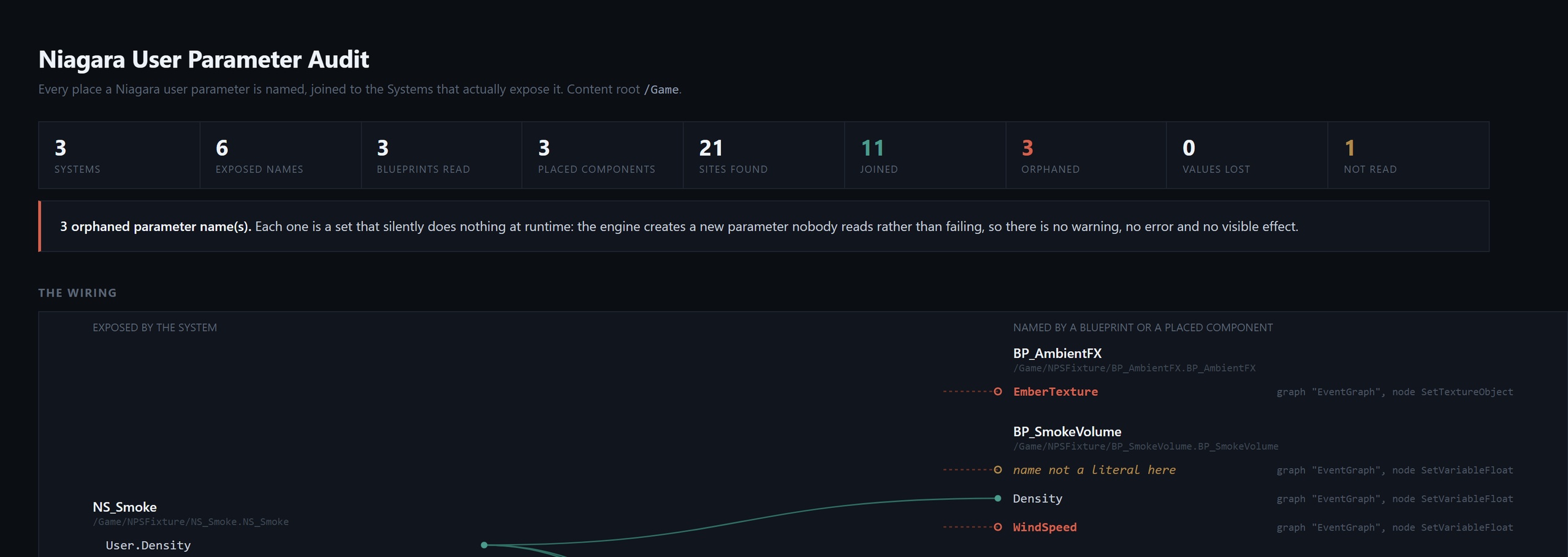
This tool builds the index nobody has. It reads every Niagara System's exposed user parameters, every Blueprint call site that names one, and every placed component override, joins them on the parameter name, and reports every name that joins to nothing, with the asset, the graph and the node.
Two findings, because they answer two different questions. A Blueprint node names no System statically, since the component is whatever was wired into the target pin at runtime, so a Blueprint name is checked against every System under the root and a name exposed by any of them is not reported. A placed component override names exactly one System, read off the component's own asset pointer, so it is checked against that System alone. If overrides were checked against every System, an override broken on one effect would be cleared the moment any other effect in your project happened to expose a parameter of the same name, which is the commonest stale override there is.
It separates data loss from untidiness. An override that carries a value somebody deliberately set on a placed effect is reported as AUTHORED VALUE LOST. The System no longer has a parameter by that name, so nothing reads that value and nothing will ever tell you.
It tells you what it could not read. A parameter name that is computed, or comes from a variable, is reported as unreadable and is never guessed at. Those are listed separately and are deliberately not counted as orphans, because "I could not read this" and "this is wrong" are different claims. Every run states what it could not see and says plainly when a count is a lower bound.
It reads the name off a known set of pin spellings and says so when it meets one it does not know. Niagara exposes user parameters from several directions and this build indexes all of them: the setters and getters on the component itself, which call the pin InVariableName; the static library functions such as SetTextureObject and SetNiagaraArrayFloat, which take the component as an argument and call it OverrideName; and the data interface entry points, which use UserParameterName, DIName, ParameterName, VariableName or plain Name. The set is not hand-remembered: an in-editor test walks the engine's own reflection database on every build and fails if any Blueprint-callable Niagara function that names a user parameter uses a spelling this build cannot read.
It refuses to invent findings. Emitter names live in a different namespace from user parameters, so SetEmitterFixedBounds and its siblings are excluded outright rather than matched, and that exclusion is tested from both directions. Capitalisation is not treated as a problem, because Unreal compares parameter names case-insensitively and this tool matches the engine's own comparison, so it agrees with what your project will actually do at runtime. There is no "did you mean".
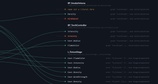
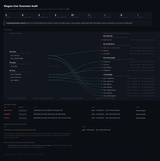
The report is a page a person reads. One self-contained HTML file, no sibling CSS and nothing to serve, so it survives being mailed to a colleague, committed beside a build or dropped in a CI artefact store. It carries a wiring map joining every exposed parameter to every call site and override that names it, with orphans drawn as connections that terminate in nothing; the orphan table split by severity; the names the build could not read; and what the scan could not see. Swap the extension for .json and you get the machine-readable report instead.
It is built for CI. Six documented exit codes, and an empty scan is not reported as success: if nothing matched, that gets its own code and its own message, because a pass with a zero next to it is not a pass. This build is audit only. It never writes to your project.
Getting Started. 1. Copy the NiagaraParameterSurgeon folder into your project's Plugins/ folder, so that you have YourProject/Plugins/NiagaraParameterSurgeon/NiagaraParameterSurgeon.uplugin. 2. Open the project and accept the offer to build the plugin the first time. 3. Confirm it loaded: Edit -> Plugins, search for Niagara Parameter Surgeon, and check it is enabled. It requires the Niagara plugin, which Unreal enables by default. 4. Audit from the editor console: Niagara.Parameters Audit. 5. Write the report a person reads: Niagara.Parameters Audit Root=/Game/FX Report=C:/temp/niagara_params.html. 6. Gate CI on the commandlet: UnrealEditor-Cmd.exe "C:\Path\YourProject.uproject" -run=NiagaraParameterSurgeon -Audit -Root=/Game -ExitOnFinish - exit code 4 means orphans were found, so fail the build on it.
The plugin adds no menus and no toolbar buttons. It is a commandlet and a console command, so it never changes the editor you are used to.
Exit codes: 0 Clean, 1 BadUsage, 2 NothingScanned, 4 FindingsFound, 5 Refused, 6 MissingInput. That table is true of the commandlet. On Windows a non-forced exit request from an in-editor console command becomes PostQuitMessage, which a headless editor does not surface as the process exit code, so the console command logs its result instead of returning it. Gate CI on the commandlet, never on the console command. We say this because we measured it on our own tools.
Switches: -Help, -Audit, -Root=/Game/Path, -Report=Path.html, -Report=Path.json, -ExitOnFinish. An unrecognised switch is refused by name and nothing runs; it is never ignored and never fuzzy-matched. -Rename and -Revert are parsed and refused in this build, so nothing can believe they ran.
Known limit, stated up front: placed components in World Partition / One File Per Actor maps are not scanned, because those maps keep their actors in separate packages that loading the map does not bring in. The tool counts those maps, warns that any placed-component result is a lower bound, and refuses to report a component verdict at all if every map it opened was one of them. The Blueprint call-site and System halves are unaffected and are complete on any project.
Technical Information. Type of asset: Code Plugin (Editor). Code Modules: NiagaraParameterSurgeon (Editor). Number of Blueprints: 0. Number of C++ Classes: 2 (UNiagaraParameterSurgeonCommandlet, FNiagaraParameterSurgeonModule), plus 4 structs, 3 enums and 3 supporting namespaces in the same module. Network Replicated: No (editor-only; contributes no runtime code). Supported Development Platforms: Windows. Supported Target Build Platforms: Windows. Example Project: No. Important notes: editor-only - the module's PlatformAllowList is ["Win64"], matching the Supported Target Build Platforms line above, and nothing ships in your packaged game. Requires the Niagara plugin, which Unreal enables by default. Built and gated against UE 5.8, the only engine version it has been verified on; we do not claim versions we have not run.
Documentation: Niagara User Parameter Surgeon - full documentation