説明
OVERVIEW VIDEO | DOCUMENTATION | EXAMPLE
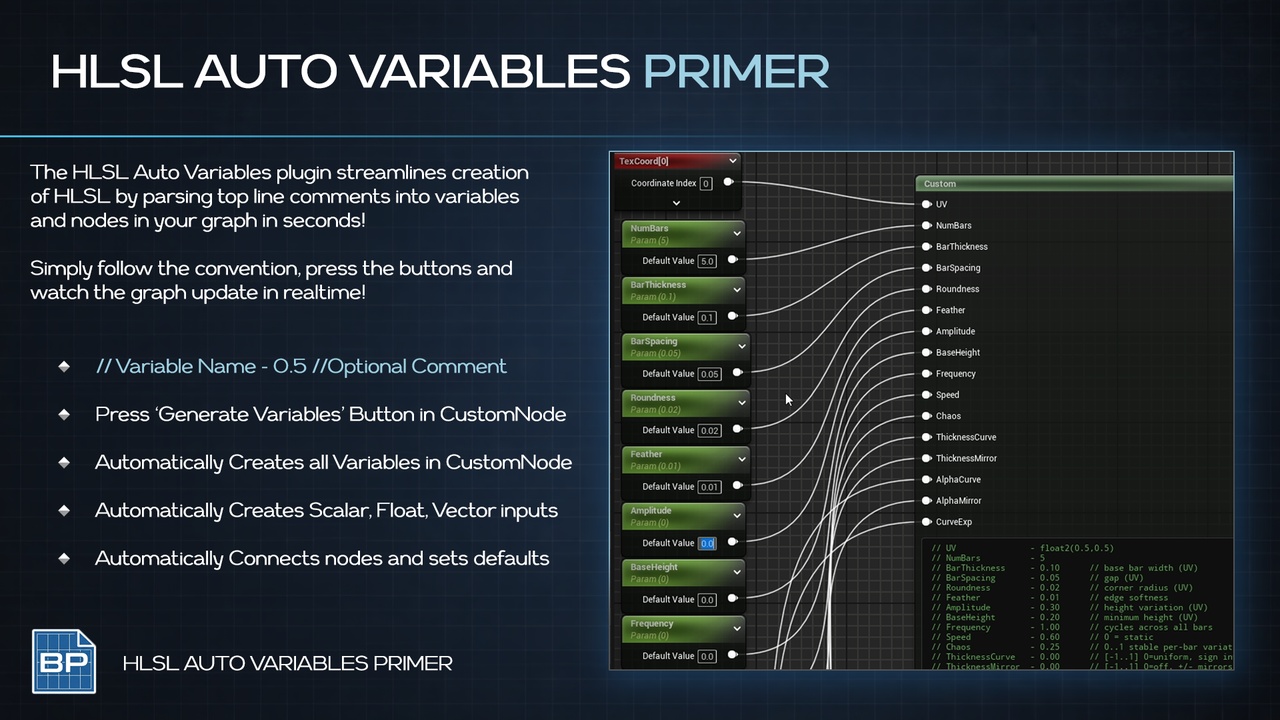
Primer HLSL Auto Variables automatically converts //Comment‑Based parameters into Material inputs.
Generate scalar, vector2/3/4, UV, and time inputs directly from HLSL code comments with one click.
CORE FEATURES
Automatic input creation from // ParamName - DefaultValue comments
also capable of inserting inputs anywhere when the list changes
Scalar, vector (float2/3/4), UV, and time node generation
Preserves existing valid input connections
Auto‑positioned nodes for clean graphs
Undo/redo support with editor transactions
One‑click parse button in the Custom node details panel
How To
Click your Custom Node
Click the Auto Parse Button at the top!
SUPPORTED TYPES
// UV
// Time
// MyInt - (5)
// MyFloat - (1.0)
// MyFloat2 - (0.0,0.0)
// MyFloat3 - (1.0,0.5,0.0)
// MyFloat4 - (1.0,0.0,0.0,1.0)
SMART BEHAVIORS
UV / TexCoord names create a TexCoord node
Time creates a Time node with IgnorePause enabled
Vector parameters are created as Vector Parameter nodes
Float2 builds Append Vector from X/Y scalar parameters
USE CASES
Fast prototyping of param‑heavy custom HLSL
Artist‑friendly custom nodes without manual input wiring
Consistent parameter naming across teams
Rapid iteration on Custom expressions
PRIMERS
Part of the Primer series, this plugin prioritizes clarity, control, and practical workflows.
MCP or AI usage (Prompt)
Write inline HLSL for Unreal's Custom Material node using the Primer AutoParamHLSL format.
Declare inputs as comments at the top:
// ParamName - (DefaultValue) // optional comment
Component count picks the type:
(1.0) -> float
(5) -> int (no decimal)
(0.0,0.0) -> float2
(0.0,0.0,0.0) -> float3
(0.0,0.0,0.0,0.0) -> float4
Bare names link reserved nodes (no value):
// UV // Creates a TexCoord node
// Time // Creates a Time node
Param comments first, blank line, then HLSL body that returns a float/float2/float3/float4. Reference params by name.