Descrição
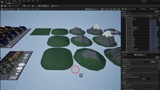
Fatigués de chercher des Actors dans un level qui en est rempli ? Maintenant, vous pouvez utiliser cette MiniMap pour l'Editor !!
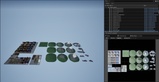
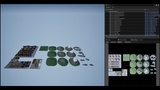
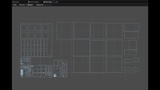
MiniMap ajoute à l'éditeur Unreal un onglet avec une carte vue de dessus de votre level. Vous voyez tout d'un coup d'œil, vous cliquez, et vous y êtes. C'est aussi simple que ça.
Mode d'emploi : https://youtu.be/Gdijh80Qzok
Voyez tout votre level d'un seul regard
• Un onglet Mini-Map que vous placez où vous voulez, accessible depuis Window > Level Editor.
• La carte s'ajuste automatiquement aux dimensions du level, et se recalcule quand vous ouvrez un autre level.
• Une échelle uniforme : la carte n'est jamais déformée, quelle que soit la taille du panneau.
• Une grille qui s'adapte au zoom, avec les axes X = 0 et Y = 0 bien visibles.
• Chaque Actor apparaît avec le contour de son emprise au sol, ou sous forme de point quand il est trop petit à l'écran.
• Les Actors sélectionnés ressortent en jaune : impossible de les rater.
• La caméra de l'éditeur est affichée avec sa position et son champ de vision, même pendant que vous tournez autour d'un objet (Alt + clic gauche). Vous savez toujours où vous êtes et ce que vous regardez !
Un clic, et vous y êtes
• Clic sur un Actor : il est sélectionné. Ctrl + clic : vous l'ajoutez ou le retirez de la sélection. Et tout ça s'annule avec Ctrl+Z.
• Double-clic sur un Actor : la caméra de l'éditeur vient se placer dessus.
• Clic dans le vide : la caméra se téléporte juste au-dessus du point cliqué, en gardant son orientation et sa hauteur au-dessus du sol. Elle arrive exactement sous votre souris, quel que soit le zoom de la carte.
• Les vues orthographiques Top et Bottom suivent le mouvement.
• Clic droit maintenu pour déplacer la carte, molette pour zoomer, centré sur le curseur (de x0,1 à x50).
Retrouvez exactement ce que vous cherchez
Décochez All actors, tapez quelques lettres dans le filtre, et seuls les Actors dont le nom de classe ou le label contient ce texte restent affichés. Vous cherchez vos PointLight ? Vos BP_Enemy ? Tapez, ils apparaissent. Vous laissez le filtre vide ? Seule votre sélection est affichée, pour une carte bien dégagée.
Un fond de carte avec une vraie image de votre level
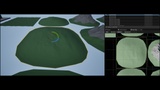
Cliquez sur Capture et MiniMap prend une photo de votre level vu du ciel, en 2048 × 2048, qu'elle utilise comme fond de carte. Vos routes, vos bâtiments, vos forêts : tout est là, sous vos Actors. Un clic sur Background l'affiche ou la masque.
Toujours à jour, sans rien faire
Vous ajoutez, supprimez, déplacez ou renommez un Actor ? La carte se met à jour toute seule. Vous ouvrez un autre level ? Elle s'ajuste automatiquement.
Pensée pour ne pas vous gêner
• Plugin 100 % Editor : rien n'est ajouté à votre jeu packagé, aucun impact sur vos performances en jeu.
• Aucun asset, aucune configuration : vous activez le plugin, vous ouvrez l'onglet, c'est parti.
• Les Actors sans signification spatiale (World Settings, Game Mode, Builder Brush...) sont ignorés, et les objets gigantesques comme les sky spheres ne faussent pas les dimensions de la carte.
• Un rappel des contrôles est affiché en bas de l'onglet.
Infos techniques
• Unreal Engine 5.6, 5.7 et 5.8
• Plateforme : Win64, éditeur uniquement
• Code source C++ complet inclus
• Compatible World Partition (les cellules chargées dans l'éditeur sont affichées)
Bon à savoir
• La carte est en 2D : les Actors superposés à des hauteurs différentes sont dessinés les uns sur les autres.
• Avec World Partition, seuls les Actors chargés dans l'éditeur sont affichés et capturés.
• La capture du fond se fait à la demande, et fige l'éditeur un court instant pendant le rendu.
Arrêtez de chercher. Commencez à trouver. Installez MiniMap et reprenez le contrôle de vos levels !
Tired of hunting for Actors in a level packed with them? Now you can use this MiniMap for the Editor!!
MiniMap adds a tab to the Unreal Editor with a top-down map of your level. You see everything at a glance, you click, and you're there. It's that simple.
User Manual: https://youtu.be/Gdijh80Qzok
See your whole level at a glance
• A dockable Mini-Map tab, available from Window > Level Editor.
• The map automatically fits the level bounds, and refits when you open another level.
• Uniform scale: the map is never stretched, whatever the panel size.
• A grid that adapts to the zoom level, with the X = 0 and Y = 0 axes clearly visible.
• Every Actor is drawn as its footprint outline, or as a dot when it's too small on screen.
• Selected Actors stand out in yellow: you can't miss them.
• The editor camera is shown with its position and field of view, even while you orbit around an object (Alt + left click). You always know where you are and what you're looking at!
One click, and you're there
• Click an Actor: it's selected. Ctrl + click: add it to or remove it from the selection. And it's all undoable with Ctrl+Z.
• Double-click an Actor: the editor camera focuses on it.
• Click empty space: the camera jumps right above the clicked point, keeping its orientation and its height above the ground. It lands exactly under your mouse, whatever the map zoom.
• The Top and Bottom orthographic viewports follow along.
• Right mouse drag to pan the map, mouse wheel to zoom, centered on the cursor (from x0.1 to x50).
Find exactly what you're looking for
Uncheck All actors, type a few letters in the filter, and only the Actors whose class name or label contains that text stay on the map. Looking for your PointLights? Your BP_Enemys? Type, and there they are. Leave the filter empty? Only your selection is shown, for a clean, uncluttered map.
A real picture of your level as the map background
Click Capture and MiniMap takes a 2048 × 2048 aerial shot of your level and uses it as the map background. Your roads, your buildings, your forests: it's all there, under your Actors. One click on Background shows or hides it.
Always up to date, hands-free
Adding, deleting, moving or renaming an Actor? The map updates itself. Opening another level? It refits automatically.
Designed to stay out of your way
• 100% Editor plugin: nothing is added to your packaged game, zero impact on in-game performance.
• No assets, no setup: enable the plugin, open the tab, and you're good to go.
• Actors with no spatial meaning (World Settings, Game Mode, Builder Brush...) are ignored, and giant objects like sky spheres don't distort the map bounds.
• A controls reminder is displayed at the bottom of the tab.
Technical details
• Unreal Engine 5.6, 5.7 and 5.8
• Platform: Win64, editor only
• Full C++ source code included
• World Partition compatible (cells loaded in the editor are displayed)
Good to know
• The map is 2D: overlapping Actors at different heights are drawn on top of each other.
• With World Partition, only Actors loaded in the editor are displayed and captured.
• The background capture is taken on demand, and briefly stalls the editor while it renders.
Stop searching. Start finding. Install MiniMap and take back control of your levels!