


Description
Async Runtime File Dialog — a native file picker plugin for Unreal Engine 5: open, save and folder dialogs from one Blueprint node, working in packaged builds, with zero C++.
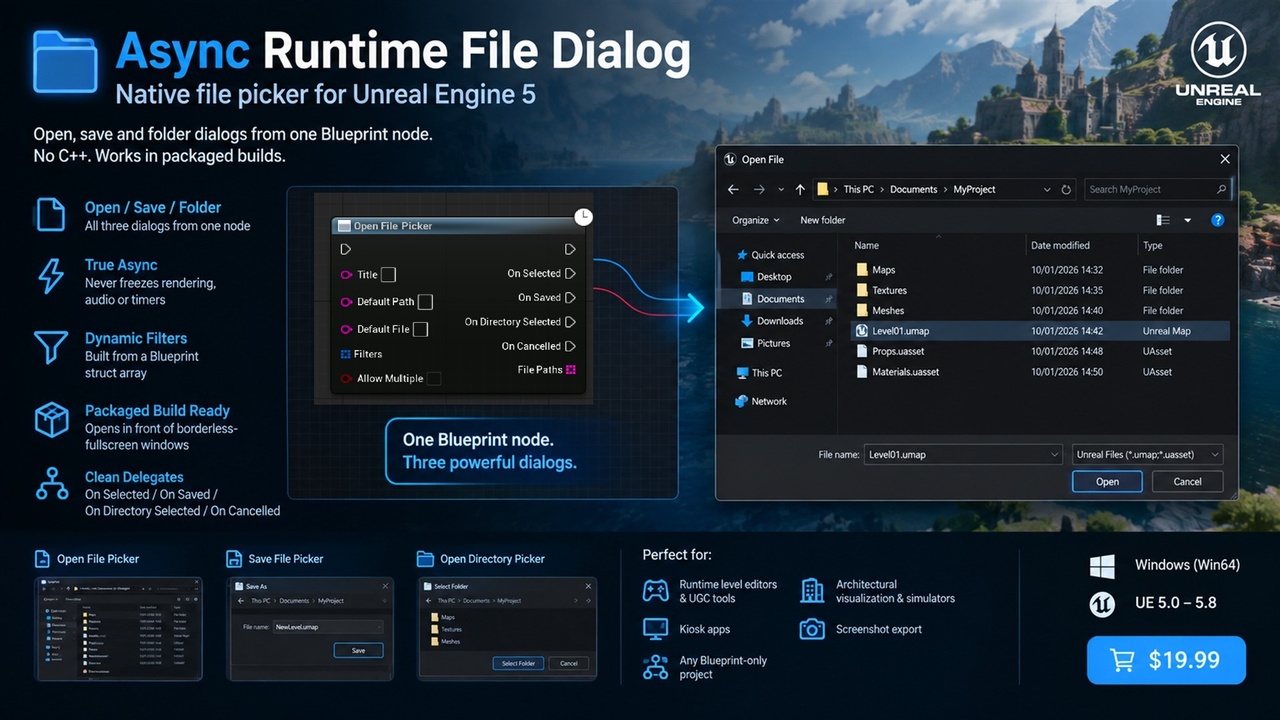
Unreal has a native file dialog, but it is locked behind C++ and editor-oriented code. This plugin wraps it as three async Blueprint nodes so your players can pick a file, choose where to save, or select a folder inside a packaged game. The dialog opens in front of your game, your game thread keeps running while it is open, and the result comes back through simple delegates. No Win32 calls, no blocking workarounds.
Key Features
• Open File Picker — single or multi-select, with a default folder
• Save File Picker — native Save As dialog with a default file name
• Open Directory Picker — native folder chooser
• True async — the dialog does not freeze rendering, audio or timers while it is open
• Dynamic filters — build "PNG Images → .png, .jpg" style filters from a Blueprint struct array at runtime, no pipe-separated strings
• Packaged-build ready — correct parent-window handling so the dialog opens in front of borderless-fullscreen windows
• Clean result flow — On Selected / On Saved / On Directory Selected / On Cancelled, always fired on the game thread
• Safe by design — a failed dialog fires On Cancelled instead of crashing
• Debug helpers — Build Filter String and All Files Filter nodes
Use Cases
• Runtime level editors and UGC tools — import meshes, images, maps and mods from disk
• Architectural visualization and simulators — load config files, export screenshots and reports
• Kiosk and installation apps — pick content folders without a keyboard shortcut hack
• Photo and screenshot export — let players choose where to save
• Any Blueprint-only project that needs real OS file access
Why This Plugin?
Unreal's desktop platform file dialog has no Blueprint access, and the usual workarounds block the game thread or hide the dialog behind a fullscreen window. This is a thin C++ layer that fixes that: async execution, runtime filters, and packaged-build window handling, all exposed as Blueprint nodes under the File Dialog category.
Get Started in 60 Seconds
Step 1: Install the plugin for your engine version (5.0–5.8) and enable it in Edit > Plugins
Step 2: In any Blueprint, call Open File Picker (or Save File Picker / Open Directory Picker)
Step 3: Wire On Selected to a Print String — done. No setup, no C++.
Support
Questions or issues? Contact us via the seller page: https://www.fab.com/sellers/HashemGameDevStore
Documentation: https://docs.google.com/document/d/e/2PACX-1vTCE4gPwrZXbhLHfN50yNvCUYxPeNIbJyy0f3fSWXKtCe2aOFyJPaxJfi_lFGtxkNHqc9VCt5Mft5Nq/pub