Descripción
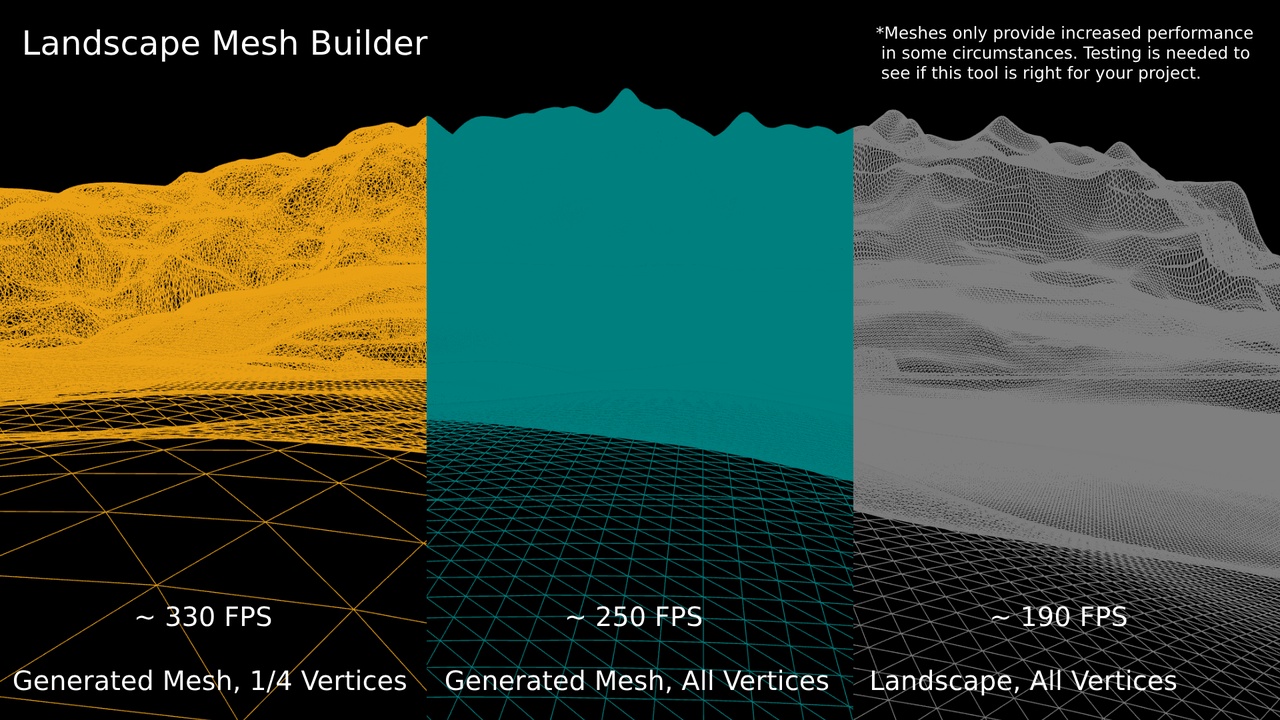
A runtime engine tool for UE5 that generates mesh assets from a landscape heightmap. Meshes sometimes provide better performance than landscapes of similar detail, and so this provides an easy method to convert existing landscapes. The tool functions as a standalone blueprint placed within a level. Requires the Geometry Script plugin.
I made this for a personal project but didn't end up using it. To prevent it going to waste, here it is for anyone to use. This tool isn't perfect and could definitely be improved, but since it uses blueprints, anyone should be able to edit it to their needs.
Blueprint Setup:
Enable the 'Geometry Script' Plugin from the 'Edit/Plugins' menu.
Export a heightmap image from a Landscape, or create one from another source. Set 'Availability' to CPU in its Texture settings.
Import a simple static mesh and configure its LOD, Collision and/or Nanite settings. These settings will be copied to each mesh generated.
Note - If you want to use Auto-LODs, try building with no LODs, and paste the Auto-LOD settings onto the mesh assets later. This seems to be quicker than generating the LODs for each mesh at runtime.
Load the 'Landscape Mesh Builder' project file, and migrate the Mesh Builder Blueprint into your existing project. Then, place the blueprint into a level, and configure its settings from the details panel.
Set 'Heightmap Texture' to your heightmap image, and 'Default Static Mesh' to the mesh you imported. Set 'Landscape Material' to the material used for the meshes, and 'Mesh Folder Path' to the folder within the project where the meshes should be created.
Enable 'Generate New Meshes on Play' to build meshes for the first time.
Run your chosen level in editor. The blueprint will print build progress to the screen. A 4K heightmap takes about 5 minutes to build on a high-end pc, and 20 minutes to build on a mid-range laptop. Higher resolutions will take longer to build. Note the 'Vertex Reduction Scale' setting, which lowers the number of vertices used, and reduces build time.
Note - If you experience an 'Infinite Loop Detected' error, either increase 'Maximum Loop Iteration Count' in your project settings, or decrease 'Landscape Component Size' to break up the calculations into smaller For loops.
Once mesh building is complete, close the level and disable 'Generate New Meshes on Play'. The blueprint will then load the existing meshes when the game is run. Alternatively, disable 'Generate Meshes' and place the meshes into the level manually to reduce loading time. After building, also make sure to select all the mesh assets and save. The 'Save All' button doesn't always save newly generated assets.
Thanks for reading, I hope this tool helps with your projects. :)